 Vinodh Ramu
Part 6 of “My Journey in Building Agents from Scratch”
Building a capable AI agent is straightforward — until it has to make more than one decision to answer a single question. This post is about the **AI agent reasoning layer**: the mechanism that lets an agent evaluate its own tool results, decide whether the job is done, and take the next step if it isn’t. Without it, even a well-equipped agent fails on anything but the most trivial inputs.
The Problem That Started It All
The **AI agent reasoning layer** — the ability to think before acting — was the one critical piece still missing when I reached Part 5. My agent could already stream its thinking in real time, manage multiple user sessions without confusion, and maintain conversation history across requests. It felt capable. It felt smart. But without a reasoning layer, it had no way to evaluate what it was doing mid-task.
A user typed: “Tell me about the iPhone.”
The agent had access to two tools:
- `search_products(query)` — searches the product catalog and returns a list of matching names
- `get_product_details(exact_name)` — fetches full details for a single, exact product name
Without thinking, the agent went straight for `get_product_details(“iPhone”)`. After all, the user mentioned iPhone — why not just fetch it?
The tool came back empty. Or worse, it returned the wrong product entirely.
The problem was obvious in hindsight: the catalog had `iPhone 7`, `iPhone 8`, `iPhone 14 Pro Max`, and several others. There was no product simply called “iPhone.” The agent needed to search first, then decide which result to use, then fetch the details. It needed to reason about what it knew — and what it didn’t — before acting.
This one broken query sent me down the path of building what researchers call the ReAct pattern. I didn’t start there. I found my way there by solving a real problem.
Beyond Reactive: Why Every Agent Needs an AI Agent Reasoning Layer
Up to this point, my agent was essentially reactive. It received a user message, scanned its available tools, picked the one that seemed most relevant, called it once, and returned the result. One question → one tool → one answer. There was no real agent decision making — just pattern matching.
That model breaks down the moment a user provides incomplete or ambiguous input — which, as it turns out, is most of the time in a real application.
The iPhone query exposed two distinct gaps in the agent’s decision-making:
- Pre-call reasoning — which tool do I even start with?
- The agent needs to evaluate the user’s input *before* reaching for a tool. Is `”iPhone”` a complete, exact product name? No. It is a partial name. That means `get_product_details` will fail. The right first move is `search_products` to narrow things down.
- Post-result reasoning — did the tool actually answer the question?**
- Even after calling `search_products` successfully and getting back `[“iPhone 7”, “iPhone 8”, “iPhone 14 Pro Max”]`, the agent isn’t done. That list of names doesn’t answer the user’s question. The agent needs to recognize that and take another step.
A purely reactive agent handles neither of these. It picks one tool, fires it once, and calls it a day. What I needed was an **AI agent reasoning layer** — a loop that lets the agent evaluate its own outputs and decide whether to keep going.
The “Aha!” Moment: Closing the LLM Tool Calling Loop
The breakthrough was surprisingly simple. The problem with standard LLM tool calling is that it is treated as a one-way street: the LLM picks a tool, the tool runs, done. Instead, I started treating tool results as new context — and sending them back to the LLM along with the original question and a verification prompt:
*”Verify the tool results for the user’s question. Below is the tool result: [tool result]. Does this fully answer the user’s question? If not, what should be done next?”*
This single change transformed the agent’s behavior. The LLM now acts as a self-evaluator. It looks at what the tool returned, compares it against what the user actually asked, and makes a judgment call:
- The tool returned a list of product names, not product details. The user asked for details. I need to call `get_product_details` with one of these names.
- The tool returned full specifications for iPhone 14 Pro Max. This answers the user’s question. I can now respond.
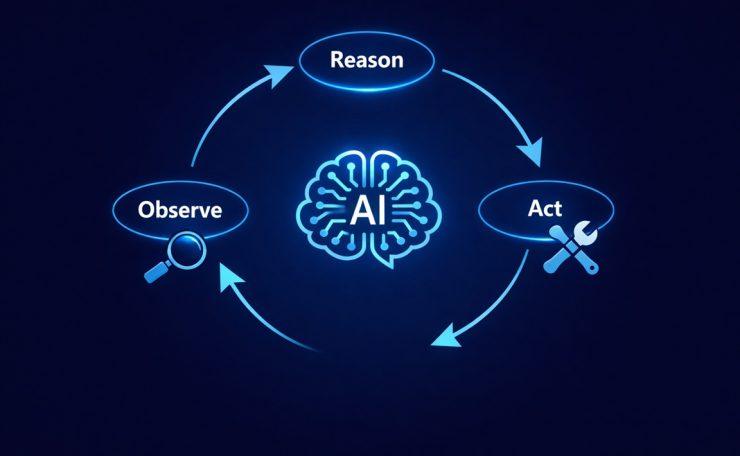
This is the Observe → Reason step, and it turns a one-shot tool call into a dynamic loop.
Discovering the ReAct Pattern
When I stepped back and looked at the loop I had built, it mapped almost perfectly onto a pattern from a 2022 research paper by Yao et al. called ReAct — short for Reason + Act.
The ReAct loop has three steps that repeat until the agent has a final answer:
- Reason — Think about the current situation. What does the user need? What tool should I call, and with what input?
- Act — Call the tool.
- Observe — Examine the result. Did it answer the question? Is more work needed?
Here is how that played out for the iPhone query:
| Step | What happened |
|---|---|
| Reason | User said “iPhone” — this is a partial name. `get_product_details` needs an exact name. I should search first. |
| Act | Call `search_products(“iPhone”)` |
| Observe | Got back `[“iPhone 7”, “iPhone 8”, “iPhone 14 Pro Max”]`. This is a list, not details. Question not answered yet. |
| Reason | I have candidate names. Need full details. I will use `get_product_details(“iPhone 14 Pro Max”)`. |
| Act | Call `get_product_details(“iPhone 14 Pro Max”)` |
| Observe | Got full product specs. This answers the user’s question. |
| Final answer | Respond to the user with the details. |
What I found compelling about this discovery was the order of events. I did not Google “how to implement ReAct” and then build it. I hit a real failure, figured out the fix, and only then realized it had a name — and that researchers had described it formally years earlier. That felt like genuine validation.
Building the AI Agent Reasoning Layer: The ReasoningMixin
Following the same Python mixin pattern I had established in Part 5, I encapsulated the AI agent reasoning layer logic into a dedicated `ReasoningMixin` class. This kept the `BaseAgent` clean and made the reasoning capability composable — an agent either has it or it doesn’t, with no messy conditionals in the core class.
The mixin has one primary responsibility: after a tool is called, take the result and ask the LLM to evaluate it against the original question before deciding what to do next.
class ReasoningMixin:
    """
    Adds a Reason-Act-Observe loop to any agent.
    After each tool call, the LLM verifies whether the result
    answers the user's question or if another tool call is needed.
    """

    def build_verification_prompt(
        self,
        user_question: str,
        tool_result: str,
        search_context: list = None
    ) -> str:
        prompt = (
            f"Verify the tool results for the user's question.\n"
            f"User question: {user_question}\n"
            f"Tool result: {tool_result}\n\n"
            f"Does this fully answer the user's question? "
            f"If yes, provide the final answer. "
            f"If no, specify which tool to call next and with what input."
        )
        if search_context:
            product_list = "\n".join(f"- {p}" for p in search_context)
            prompt += (
                f"\n\nAdditionally, the following related products are available in our catalog:\n"
                f"{product_list}\n"
                f"After answering the user's question, mention these other products "
                f"and suggest follow-up questions the user could ask about them."
            )
        return prompt

    def reason_about_result(
        self,
        user_question: str,
        tool_result: str,
        search_context: list = None
    ) -> dict:
        """
        Sends tool results back to the LLM for evaluation.
        Optionally includes a list of related products found during search
        so the agent can surface suggestions in its final response.
        """
        verification_prompt = self.build_verification_prompt(
            user_question, tool_result, search_context
        )
        messages = [{"role": "user", "content": verification_prompt}]
        response = self.llm.chat(messages, tools=self.tools)
        return response


class BaseAgent:
    """Core agent with LLM and tools."""
    def __init__(self, tools, llm):
        self.tools = tools
        self.llm = llm


class ProductAgent(BaseAgent, ReasoningMixin):
    """
    An agent that answers product questions.
    Composes BaseAgent + ReasoningMixin for the full ReAct loop.
    """
    def __init__(self, tools, llm):
        BaseAgent.__init__(self, tools, llm)

    def run(self, user_question: str) -> str:
        messages = [{"role": "user", "content": user_question}]
        max_iterations = 5  # Safety limit to prevent infinite loops
        search_context = None  # Holds product list from search_products, if called

        for _ in range(max_iterations):
            response = self.llm.chat(messages, tools=self.tools)

            # If the LLM has a final answer (no more tool calls needed)
            if response.finish_reason == "stop":
                return response.content

            # Act: execute the tool the LLM decided to call
            tool_name = response.tool_call.name
            tool_args = response.tool_call.arguments
            tool_result = self.tools[tool_name](**tool_args)

            # If this was a search call, capture the results as context
            # so the final response can suggest related products
            if tool_name == "search_products" and isinstance(tool_result, list):
                search_context = tool_result

            # Observe + Reason: send the result back to the LLM for evaluation.
            # Pass search_context so the agent can enrich its final answer
            # with available product suggestions.
            next_decision = self.reason_about_result(
                user_question, str(tool_result), search_context
            )
            messages.append({"role": "tool", "content": str(tool_result)})
            messages.append({"role": "assistant", "content": next_decision.content})

            # If the LLM signals it has enough to answer, break out
            if next_decision.finish_reason == "stop":
                return next_decision.content

        return "I was unable to fully answer your question after multiple attempts."
A few design decisions worth calling out:
- The `max_iterations` guard is essential. Without it, a poorly-formed question or ambiguous tool result could cause the agent to loop forever. Five iterations is generally more than enough for real queries.
- The verification prompt is opinionated. It forces the LLM to make a binary choice: either this answers the question, or tell me what to call next. This keeps the loop decisive rather than open-ended.
- The mixin stays stateless. It does not store anything itself — it just provides the `reason_about_result` method. The agent’s message history is managed in the `run` method, keeping concerns well separated.
- `search_context` is optional by design. If the agent never calls `search_products` (because the user gave an exact name), the enrichment block is simply skipped. The same code path handles both cases cleanly.
Going Beyond the Answer: Enriched Responses
Once the reasoning loop was working, I noticed an opportunity to make the agent more useful without adding any extra tool calls.
When `search_products` runs, it returns a list of matching products — not just the one the agent eventually fetches details for. That list is valuable. It tells the user what else is available. A good assistant doesn’t just answer the exact question asked; it helps the user discover what they didn’t know to ask.
So I made a small change: the search results are now passed into the verification prompt as `search_context`. When the agent produces its final answer, the LLM is instructed to:
- Answer the user’s original question with the product details
- Mention the other available products from the search
- Suggest natural follow-up questions the user could ask
This transforms a transactional exchange into a conversational one. The agent doesn’t just close the loop — it opens the next one.
The AI Agent Reasoning Layer: Before and After
The difference in behavior is dramatic:
Before the reasoning layer:
User: “Tell me about the iPhone”
Agent: [calls get_product_details(“iPhone”)]
Tool: Error — no product named “iPhone” found
Agent: “I couldn’t find that product.”
After the reasoning layer:
User: “Tell me about the iPhone”
Agent: [Reason] Partial name detected — search first
Agent: [Act] calls search_products(“iPhone”)
Tool: [“iPhone 7”, “iPhone 8”, “iPhone 14 Pro Max”]
Agent: [Observe] These are names, not details. Question not answered.
Agent: [Reason] Most likely match: iPhone 14 Pro Max. Store full list as search_context.
Agent: [Act] calls get_product_details(“iPhone 14 Pro Max”)
Tool: {name: “iPhone 14 Pro Max”, price: $1099, storage: “256GB”, …}
Agent: [Observe] Full details returned. Question answered. Enrich with search_context.
Agent: “The iPhone 14 Pro Max is priced at $1,099 and comes with 256GB of storage.
We also have these iPhones available:
– iPhone 7
– iPhone 8
– iPhone 14 Pro Max
Would you like to know more? You could ask:
→ ‘What is the price of the iPhone 8?’
→ ‘Compare iPhone 7 and iPhone 14 Pro Max’
→ ‘What colors does the iPhone 14 Pro Max come in?'”
Same user question. A much richer, more helpful outcome.
Pitfalls I Hit (And How I Fixed Them)
The ReAct loop solved the core problem, but building it in production surfaced three edge cases that took real debugging to resolve.
1. No Results — The Keyword Gap
The first failure was subtle. Users don’t think in database keywords. A user searching for *”budget smartphone with long battery”* won’t match any product name. `search_products(“budget smartphone long battery”)` comes back empty — not because the product doesn’t exist, but because the query doesn’t match the catalog’s terminology.
The fix was to add a third tool: a semantic search agent tool built on-the-fly using sentence transformer embeddings. Instead of keyword matching, it converts the query and all product names into vectors and finds the closest match by semantic similarity. When `search_products` returns nothing, the AI agent reasoning layer now falls back to `semantic_search(query)` before giving up.
This was its own mini-lesson: tools are not fixed. A well-designed multi-step AI agent expands its own toolkit to cover gaps discovered in production.
2. Multiple Equally Valid Matches
When a user says “iPhone Pro” and the search returns both `iPhone 13 Pro` and `iPhone 14 Pro`, the agent has no clear winner. Picking blindly felt wrong — what if the user wanted the older model?
The approach I settled on: fetch details for the most recent match, but surface all options in the response. The agent answers with the most likely product while explicitly listing the alternatives and asking the user to confirm. The `search_context` enrichment we built earlier makes this natural — the suggestion list is already being generated. The agent just adds a clarification question at the end.
Agent: “Here are the details for the iPhone 14 Pro…
I also found the iPhone 13 Pro in our catalog.
Were you looking for that model instead?”
3. Max Iterations — Preventing Infinite Loops
The `max_iterations` guard catches runaway loops, but I also added a smarter constraint: the agent cannot call the same tool with the same parameters twice. If `search_products(“iPhone”)` already ran and the loop tries to call it again with identical arguments, it is blocked and the agent is forced to either use a different tool or produce a final answer.
This catches a specific failure mode where the LLM gets stuck re-evaluating the same result repeatedly — often because the verification prompt wasn’t clear enough about what “fully answered” means. The duplicate-call guard breaks the cycle without just giving up.
# Track previous calls to prevent duplicate tool invocations
call_history = set()

# Inside the run loop, before executing the tool:
call_key = (tool_name, str(sorted(tool_args.items())))
if call_key in call_history:
    # Force a stop — don't call the same tool with the same args again
    break
call_history.add(call_key)
Key Takeaways
- A reactive agent picks one tool and calls it once. It breaks on ambiguous or partial input.
- The ReAct pattern — Reason, Act, Observe — gives the agent a loop to evaluate its own outputs before deciding what to do next.
- The verification prompt is the bridge between observation and next action. It turns the LLM into a self-evaluator, not just a tool picker.
- Implementing this as a `ReasoningMixin` keeps the pattern composable and reusable, consistent with the rest of the agent architecture.
- You do not need to know about ReAct to implement it. Solve a real problem well enough, and you will find you have already arrived there.
Try It Yourself
- [ ] Build a two-tool agent — one for search, one for detail fetch — and reproduce the iPhone scenario
- [ ] Write a verification prompt and observe how the LLM evaluates tool results differently from raw responses
- [ ] Add a `max_iterations` guard and test what happens when you set it to 1 vs 5
- [ ] Try giving the agent a completely ambiguous query (e.g., just “phone”) and see how the loop handles it
- [ ] Add the duplicate-call guard and intentionally craft a prompt that would cause an infinite loop without it
- [ ] Replace `search_products` with a semantic search tool using sentence-transformers and test with natural language queries
Conclusion
Building the AI agent reasoning layer was one of the most satisfying moments in this journey. The ReAct pattern — Reason, Act, Observe — didn’t come from a textbook. It came from watching an agent fail at a simple product search and asking: *why didn’t it think before it acted?*
The `ReasoningMixin` gave the agent exactly that: a structured habit of pausing after every tool result to ask “did this actually answer the question?” This LLM self-evaluation loop, combined with the search context enrichment, transformed the agent from a one-shot lookup machine into a conversational assistant — one that answers your question and immediately surfaces what else you might want to know.
But as the multi-step AI agent got smarter at individual decisions, a new problem started appearing. When a user asked something that required three or four steps in a specific order, the reasoning loop would handle each step correctly in isolation — but it had no memory of the overall goal. It couldn’t track whether it was making progress. It had no concept of a plan.
If the AI agent reasoning layer is the agent’s ability to think about *each step*, the planning layer is its ability to think about *the whole journey*. That’s what comes next.