 Vinodh Ramu
Part 2 of “My Journey in Building AI Agents from Scratch”
Introduction
In Part 1, I shared why I started with Autogen and hit its limits. This post is about what happened next — building my first AI agent from scratch using just an LLM and tool calling.
Spoiler: Building AI agents is simpler than I expected. And that simplicity changed everything.
The Problem with Autogen’s Loop
After getting Autogen to work, I wanted to understand what was happening under the hood. So I enabled the streaming option.
What I saw surprised me: multiple tool calls happening repeatedly. The LLM was calling tools, getting results, calling more tools — sometimes the same ones. It felt like the agent was doing extra work, maybe to verify results. But I couldn’t tell for sure.
I tried to control it. The only option I found was `max_iterations`. But here’s the problem:
You can’t pre-decide how many iterations an agent needs.
Task A might need 2 tool calls. Task B might need 5. The number depends entirely on the task complexity and what the LLM decides to do. Setting a fixed limit is like telling a chef “you can only use 3 ingredients” without knowing what dish they’re making.
I was stuck. Reducing unnecessary LLM calls wasn’t possible. Logical stopping conditions were out of reach. The flow was completely outside my control.
That’s when I decided: I need to understand what the LLM actually returns.
My First Tools for the AI Agent
Before diving into the code, let me show you what “tools” actually are. They’re just functions — and a way to describe them to the LLM.
I started simple. Basic math operations and a string function:
def add(a, b):
    return a + b

def subtract(a, b):
    return a - b

def multiply(a, b):
    return a * b

def divide(a, b):
    return a / b if b != 0 else "Cannot divide by zero"

def reverse_string(s):
    return s[::-1]
And the tool definitions for the LLM (this tells the LLM what tools exist and how to use them):
tools = [
    {
        "type": "function",
        "function": {
            "name": "add",
            "description": "Add two numbers",
            "parameters": {
                "type": "object",
                "properties": {
                    "a": {"type": "number"},
                    "b": {"type": "number"}
                },
                "required": ["a", "b"]
            }
        }
    },
    # Similar definitions for subtract, multiply, divide, reverse_string
]
Now I had tools. The question was: what does the LLM actually do with them?
Going Back to Basics: Building AI Agents Step by Step
Instead of digging into Autogen’s source code, I took a different approach. I wanted to see the raw LLM response myself.
I created a simple class called `ChatExecutor`:
class ChatExecutor:
    def __init__(self, tools):
        self.client = AzureOpenAI(
            api_key=os.getenv("AZURE_OPENAI_API_KEY"),
            api_version=os.getenv("AZURE_OPENAI_API_VERSION"),
            azure_endpoint=os.getenv("AZURE_OPENAI_ENDPOINT")
        )
        self.tools = tools

    def execute_prompt(self, prompt):
        response = self.client.chat.completions.create(
            model="gpt-4.1",
            messages=[{"role": "user", "content": prompt}],
            tools=self.tools
        )
        return response
Nothing fancy. Just send a prompt with tools to Azure OpenAI GPT-4.1 and get a response.
The Revelation About How AI Agents Work
I ran it. And then I looked at the response.
The `finish_reason` said: **`tool_calls`**
But wait — **no tools were actually called**. The response just contained the tool name and parameters that the LLM *wanted* to call.
That’s when it clicked:
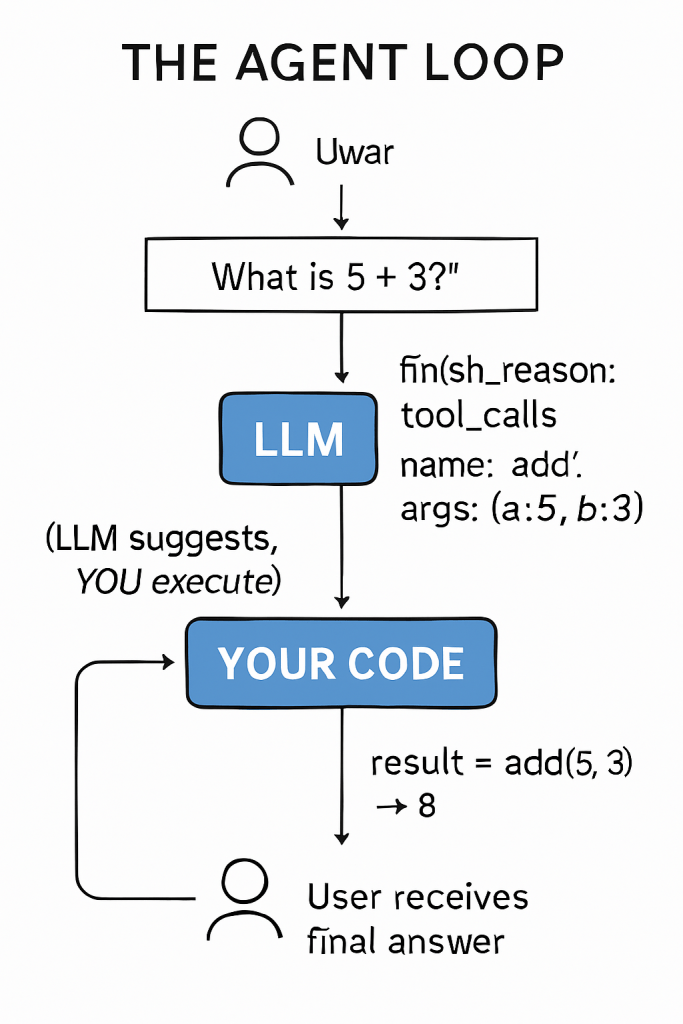
The LLM doesn’t call tools. It tells YOU which tool to call. You have to execute it yourself.
This was the fundamental truth that frameworks had hidden from me. The LLM is just a decision-maker. It says “call the `add` function with arguments 5 and 3.” But actually running that function? That’s your code.
Manually Calling the Tools
The response from the LLM contained the tool name and arguments. I extracted them and manually mapped to my functions:
# Extract from LLM response
tool_name = response.choices[0].message.tool_calls[0].function.name
arguments = json.loads(response.choices[0].message.tool_calls[0].function.arguments)

# Manual mapping
if tool_name == "add":
    result = add(arguments["a"], arguments["b"])
elif tool_name == "subtract":
    result = subtract(arguments["a"], arguments["b"])
elif tool_name == "multiply":
    result = multiply(arguments["a"], arguments["b"])
elif tool_name == "divide":
    result = divide(arguments["a"], arguments["b"])
elif tool_name == "reverse_string":
    result = reverse_string(arguments["s"])
I know — it’s not elegant. A bunch of `if-elif` statements. But it worked. And when it worked, I had a strange thought:
“Wait… THIS is the agent?”
The Missing Piece: Context
But then I tried something else.
**First prompt:** “What is 5 + 3?”
The agent called `add(5, 3)`, got `8`, sent it back to the LLM, and I got the final answer: “The result is 8.”
**Second prompt:** “Add 4 to the result.”
The LLM responded: “I don’t know what result you’re referring to. Could you please provide the number?”
Wait, what? It just told me the result was 8. Why doesn’t it remember?
Because I was sending each prompt as a fresh conversation:
# ❌ Wrong: No context
messages = [{"role": "user", "content": "Add 4 to the result"}]
response = client.chat.completions.create(
    model="gpt-4.1",
    messages=messages,
    tools=tools
)
# LLM has no idea what "the result" means
The LLM doesn’t remember previous calls. Every API call is stateless. You have to send the entire conversation history every time.
Building the Conversation Context
Here’s how the agent loop actually works:
# Start with user's prompt
messages = [{"role": "user", "content": "What is 5 + 3?"}]

# First LLM call
response = client.chat.completions.create(
    model="gpt-4.1",
    messages=messages,
    tools=tools
)

# LLM wants to call a tool
if response.choices[0].finish_reason == "tool_calls":
    tool_call = response.choices[0].message.tool_calls[0]

    # Add assistant's response to conversation
    messages.append(response.choices[0].message)

    # Execute the tool
    result = add(5, 3)  # Returns 8

    # Add tool result to conversation
    messages.append({
        "role": "tool",
        "tool_call_id": tool_call.id,
        "content": str(result)
    })

    # Second LLM call with FULL context
    response = client.chat.completions.create(
        model="gpt-4.1",
        messages=messages,  # user + assistant + tool result
        tools=tools
    )

    # Now LLM can give final answer: "The result is 8"
Now `messages` contains:
- User: “What is 5 + 3?”
- Assistant: (tool call request for `add`)
- Tool: “8”
- Assistant: “The result is 8.”
For the next prompt, keep appending:
# Add new user message to existing conversation
messages.append({"role": "user", "content": "Add 4 to the result"})

# LLM now has full context — knows "the result" is 8
response = client.chat.completions.create(
    model="gpt-4.1",
    messages=messages,  # Full history!
    tools=tools
)
# LLM calls add(8, 4) → returns 12 ✅
This is the complete picture. The agent loop isn’t just “call LLM → call tool → done.” It’s:
- Build messages list
- Call LLM**
- If tool call: append assistant message, execute tool, append tool result
- Call LLM again with updated messages
- Repeat until no more tool calls
- Keep messages for future prompts (context)
This Is the Agent
Yes. This is the core of building AI agent:
- Send a prompt with tool definitions to the LLM
- LLM responds with which tool to call (or a direct answer)
- You execute the tool
- You send the result back to the LLM
- Repeat until LLM gives a final answer (no more tool calls)
That’s it. That’s what Autogen, LangChain, and every other framework is doing under the hood. They’ve just wrapped it in abstractions.
Why I Built My Own
With Autogen, I couldn’t:
- Control when to stop logically (not just by iteration count)
- Reduce unnecessary LLM calls
- Understand why certain decisions were made
- Add custom logic between tool calls
With my own implementation, I could see everything — LLM responses, tool calls, and decision points. Complete visibility.
Was it more work? Yes. Was it worth it? Absolutely.
When Native Tool Calling Fails in AI Agents
But here’s something I discovered the hard way: native tool calling doesn’t always work reliably.
Sometimes, instead of returning a proper `tool_calls` response, the LLM would say:
“I’ll use the add tool to calculate this for you.”
And then… nothing. `finish_reason: stop`. No actual tool call in the response. The LLM was describing what it should do instead of doing it.
I tried different things:
- Adding `tool_choice: “auto”`
- Changing tool descriptions
- Tweaking the prompt
It worked sometimes, but not consistently.
My Solution: Prompt-Based Tool Calling
Instead of relying on native tool calling, I created my own format via the system prompt:
system_prompt = """You are a helpful assistant with access to tools.

When a tool call is needed, respond ONLY in this format:
==Tool calling Format==
```json
{
    "name": "tool_name",
    "arguments": {"arg1": "value1", "arg2": "value2"},
    "reason": "why this tool is needed"
}
```
For general questions that don't need tools, respond normally.
"""
Now my agent loop checks for this format:
def parse_tool_call(response_content):
    if "==Tool calling Format==" in response_content:
        # Extract JSON from response
        json_match = re.search(r'```json\s*(.*?)\s*```', response_content, re.DOTALL)
        if json_match:
            return json.loads(json_match.group(1))
    return None

# In the agent loop
tool_call = parse_tool_call(response.choices[0].message.content)
if tool_call:
    # Execute the tool
    result = execute_tool(tool_call["name"], tool_call["arguments"])
    print(f"Reason: {tool_call['reason']}")  # Bonus: transparency!
else:
    # Normal response, no tool needed
    print(response.choices[0].message.content)
Why This Works Better
| Native Tool Calling | Prompt-Based Format |
| Sometimes LLM “describes” instead of “calls” | LLM always follows format |
| Opaque decision-making | `reason` field explains why |
| Dependent on model support | Works with any LLM |
| Less control | Full control over structure |
The `reason` field was an unexpected bonus. It gave me visibility into why the LLM chose that tool. This later evolved into a full reasoning layer
Use Both Approaches
Here’s my recommendation:
- Start with native tool calling — it’s cleaner when it works
- Have prompt-based format as fallback — for reliability
- Add the `reason` field — transparency is valuable
def get_tool_call(response):
    # Try native first
    if response.choices[0].finish_reason == "tool_calls":
        return extract_native_tool_call(response)

    # Fallback to prompt-based format
    return parse_tool_call(response.choices[0].message.content)
Key Takeaways
- The LLM doesn’t execute tools — it only suggests which tool to call with what parameters
- You are the executor — your code runs the actual functions
- `finish_reason: tool_calls` means the LLM wants you to call a tool, not that it called one
- Frameworks hide this simplicity — which is fine until you need control
- Building AI agents from scratch gives you complete understanding — and complete control
Try Building AI Agents Yourself
- Create a simple `ChatExecutor` class that calls Azure OpenAI (or OpenAI)
- Define one tool (start with `add`)
- Send a prompt like “What is 5 + 3?”
- Print the raw response — look at `finish_reason` and `tool_calls`
- Manually call your function with the extracted arguments
- Send the result back to the LLM and get the final answer
Start simple. See the response. Understand the flow. Then build from there.
Previous: Why I Started with Autogen Next: Shared Python Tools for AI Agents Using MCP