 Vinodh Ramu
Part 8 of “My Journey in Building Agents from Scratch” — AI agent tool design for structured data
By the time I finished the planning module in Part 7, my agent was genuinely capable — it could reason, plan, track progress, and execute multi-step tasks. What it could not do was answer a real question about real data. That was the next gap to close. And closing it exposed an AI agent tool design problem I had not anticipated: the way I had been building APIs for the UI turned out to be exactly wrong for an agent.
The Setup: Real Data, Real Questions
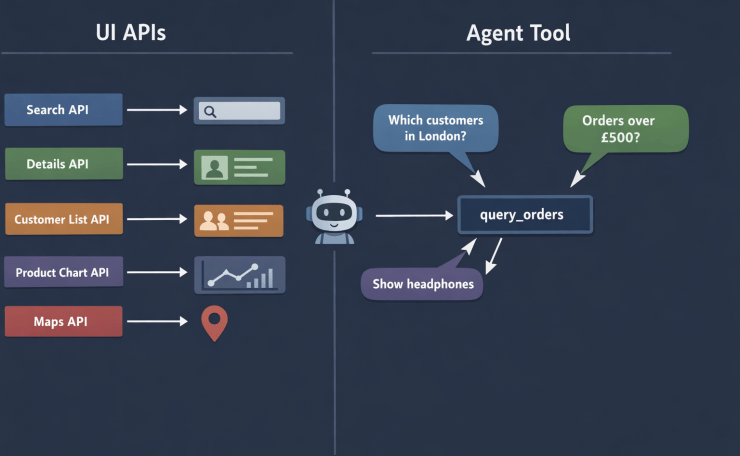
The application I was working on had an orders dataset — a standard picture: customers placing orders, each order containing one or more products. For the UI, I had built five dedicated API endpoints:
| API | What it returned |
|---|---|
GET /orders/search?status=&date_from= | Order list for the search screen |
GET /orders/{order_id} | Full details for a single order |
GET /customers/{customer_id}/orders | All orders for one customer |
GET /products/{product_id}/sales | Orders containing a specific product |
GET /orders/by-region?region= | Orders filtered by customer region |
Each one was purpose-built for a specific screen. They were clean, fast, and completely adequate for the UI. So I registered all five as agent tools and pointed the agent at them.
For scripted demo questions — “Show me order 1042” or “What orders came from London?” — it worked fine. The agent picked the right endpoint, got its answer, and returned it.
Then a colleague typed this:
“Which customers from London bought Electronics products last month and spent more than £500?”
The agent tried GET /orders/by-region?region=London. That gave it a list of order IDs. It then tried GET /orders/{order_id} to fetch details — but it could only call it for one order at a time, and it had no way to filter by product category or order total at that stage. It looped, made redundant calls, and eventually returned a partial answer it had cobbled together incorrectly.
The tools were not wrong. They were just shaped for a UI, not for an agent.
Why UI APIs Are the Wrong Shape for AI Agent Tool Design
This is the core insight the problem forced on me: UI APIs are shaped around screens. Agent tools need to be shaped around data.
A screen knows exactly what it needs. The order details screen needs order ID, date, status, line items, and customer name — and nothing else. So you build an API that returns exactly that. This is good API design for a UI.
An agent does not know in advance what it needs. The question determines the shape of the answer. “Which London Electronics customers spent more than £500?” needs customer_name, region, category, total — a combination that no single UI screen ever asked for, so no UI API ever provided it.
The more tools I registered, the worse the composability problem got. The agent had to call multiple tools, reconcile their overlapping results, and figure out which tool to use for which piece of data. The question of which tool to call became as hard as the question itself.
The fix was to stop building tools shaped around UI screens and start building tools shaped around the data structure itself. That shift is the core of good AI agent tool design.
Building the Order View
The five separate APIs were drawing from the same four underlying tables: orders, order_items, customers, and products. I created one denormalized database view that joined them all:
-- order_view: a single flat view combining all four tables
CREATE VIEW order_view AS
SELECT
    o.order_id,
    o.order_date,
    o.status,
    o.total,
    c.customer_id,
    c.customer_name,
    c.email,
    c.region,
    p.product_id,
    p.product_name,
    p.category,
    p.unit_price,
    oi.quantity
FROM orders o
JOIN customers c    ON o.customer_id = c.customer_id
JOIN order_items oi ON o.order_id    = oi.order_id
JOIN products p     ON oi.product_id = p.product_id
This is not a new idea — denormalized views for reporting are standard practice. What is slightly different here is that the *consumer* of this view is not a human writing a SQL query, but an LLM deciding what to ask for.
AI Agent Tool Design: The Dynamic Query Tool
With the view in place, one tool replaces all five:
# https://docs.python.org/3/library/sqlite3.html
import sqlite3
from contextlib import contextmanager

# Whitelist of valid column names — the LLM may only request these.
# Validated before any query is built. Never trust LLM output directly in SQL.
ALLOWED_COLUMNS = {
    "order_id", "order_date", "status", "total",
    "customer_id", "customer_name", "email", "region",
    "product_id", "product_name", "category", "unit_price", "quantity",
}

# Whitelist of valid comparison operators.
# Prevents operator injection — the LLM cannot sneak in arbitrary SQL fragments.
ALLOWED_OPERATORS = {"=", "!=", ">", "<", ">=", "<=", "like"}


@contextmanager
def get_db():
    conn = sqlite3.connect("orders.db")
    conn.row_factory = sqlite3.Row
    try:
        yield conn
    finally:
        conn.close()


def query_orders(
    select_columns: list[str],
    filters: list[dict] | None = None,
    limit: int = 50,
) -> list[dict]:
    """
    Query the order_view with any combination of columns and filters.

    Available columns:
      order_id, order_date, status, total,
      customer_id, customer_name, email, region,
      product_id, product_name, category, unit_price, quantity

    Filter format:
      [{"column": "region", "op": "=", "value": "London"},
       {"column": "total",  "op": ">", "value": 500}]

    Supported operators: =, !=, >, <, >=, <=, like
    limit: maximum rows to return (default 50, max 200)
    """
    # --- Validate columns against whitelist ---
    invalid = set(select_columns) - ALLOWED_COLUMNS
    if invalid:
        raise ValueError(f"Unrecognised columns: {invalid}. "
                         f"Allowed: {sorted(ALLOWED_COLUMNS)}")

    # --- Build SELECT clause (safe: all values came from the whitelist) ---
    select_clause = ", ".join(select_columns)

    # --- Build WHERE clause with parameterized values ---
    where_parts: list[str] = []
    params: list = []

    for f in (filters or []):
        col = f["column"]
        op  = f["op"]
        val = f["value"]

        if col not in ALLOWED_COLUMNS:
            raise ValueError(f"Invalid filter column: {col!r}")
        if op not in ALLOWED_OPERATORS:
            raise ValueError(f"Invalid operator: {op!r}")

        # Column name comes from the whitelist (safe).
        # Value is always a parameterized placeholder (safe).
        where_parts.append(f"{col} {op} ?")
        params.append(val)

    where_clause = ("WHERE " + " AND ".join(where_parts)) if where_parts else ""

    # Clamp limit to prevent runaway queries
    safe_limit = min(int(limit), 200)
    sql = f"SELECT {select_clause} FROM order_view {where_clause} LIMIT ?"
    params.append(safe_limit)

    with get_db() as conn:
        rows = conn.execute(sql, params).fetchall()
    return [dict(row) for row in rows]
A few design decisions worth calling out:
- **Two layers of SQL injection defence.** Column names and operators come from a whitelist — they are never interpolated from raw LLM output. Values are always passed as parameterized placeholders (`?`). These two defences are independent; either one alone is insufficient.
- The docstring is the schema. The full list of available columns lives in the docstring, not in a separate config file. When this function is registered as a tool, the LLM receives the docstring as the tool’s description. That is the LLM’s only source of truth about what columns exist — if a column is not listed here, the LLM cannot request it.
limitis clamped server-side. The LLM can request any limit, but the function enforces a ceiling of 200. The LLM should not be able to trigger an unbounded table scan.
AI Agent Tool Design: Exposing the Query as a FastAPI Service
The query_orders function runs as a standalone FastAPI service, the same way the agent API from Part 4 was deployed. Any agent instance — regardless of which server it is running on — can call it over HTTP.
from fastapi import FastAPI, HTTPException
from pydantic import BaseModel, Field

app = FastAPI()

class FilterItem(BaseModel):
    column: str
    op: str
    value: str | int | float

class QueryRequest(BaseModel):
    select_columns: list[str]
    filters: list[FilterItem] = Field(default_factory=list)
    limit: int = 50

@app.post("/query")
def query_orders_endpoint(request: QueryRequest) -> list[dict]:
    try:
        return query_orders(
            select_columns=request.select_columns,
            filters=[f.model_dump() for f in request.filters],
            limit=request.limit,
        )
    except ValueError as e:
        # Return a 400 so the agent gets a clear error it can reason about,
        # rather than a silent 500 that looks like a tool failure.
        raise HTTPException(status_code=400, detail=str(e))

# To run: uvicorn orders_api:app --reload --port 8001
The HTTP wrapper adds one important behaviour: it converts ValueError (invalid column or operator) into a 400 Bad Request with the error detail in the body. When the agent calls this via the ReAct loop, a 400 with a clear message — “Unrecognised columns: {‘kategory’}” — gives the LLM enough information to self-correct and retry with the right column name.
What the LLM Actually Produces
Given the question “Which customers from London bought Electronics last month and spent more than £500?”, the LLM generates this tool call:
{
  "select_columns": ["customer_name", "region", "product_name", "category", "total", "order_date"],
  "filters": [
    {"column": "region",     "op": "=",    "value": "London"},
    {"column": "category",   "op": "=",    "value": "Electronics"},
    {"column": "order_date", "op": ">=",   "value": "2026-02-01"},
    {"column": "order_date", "op": "<",    "value": "2026-03-01"},
    {"column": "total",      "op": ">",    "value": 500}
  ],
  "limit": 50
}
That maps directly to:
SELECT customer_name, region, product_name, category, total, order_date
FROM order_view
WHERE region = 'London'
  AND category = 'Electronics'
  AND order_date >= '2026-02-01'
  AND order_date < '2026-03-01'
  AND total > 500
LIMIT 50
None of the five original UI APIs could have produced this. The agent answered it with a single tool call.
When the User Doesn’t Know the Exact Name
There is a second, equally common scenario that the same tool handles without any changes: the user asks about something they cannot name precisely.
In Part 6, this was the iPhone problem — the user said “iPhone” and the agent tried to fetch details for a product that didn’t exist under that exact name. Back then the fix was a reasoning loop with two separate tools: search_products first, then get_product_details. The same problem appears here, and the same tool solves both steps.
A user types:
“Show me orders for the wireless headphones”
There is no product called "wireless headphones" in the catalog. The products are Sony WH-1000XM5 and Bose QuietComfort 45 — both categorised as "Headphones". Their model names contain no common keyword, but the category does. The agent uses like on category to surface the options:
{
  "select_columns": ["product_id", "product_name", "category"],
  "filters": [
    {"column": "category", "op": "like", "value": "%headphone%"}
  ],
  "limit": 10
}
The result comes back:
[
  {"product_id": 17, "product_name": "Sony WH-1000XM5",      "category": "Headphones"},
  {"product_id": 23, "product_name": "Bose QuietComfort 45", "category": "Headphones"}
]
The agent surfaces this list to the user:
“I found two products in the Headphones category: Sony WH-1000XM5 and Bose QuietComfort 45. Which one would you like to see orders for?”
Once the user picks, the next tool call uses product_name with op: "=" and the exact name. The disambiguation and the data fetch are two calls to the same tool — no second endpoint needed.
This also illustrates a subtlety: the agent has to choose the right column to apply like to. Filtering on product_name would return nothing here — the keyword “headphone” is in the category, not the model name. The LLM makes that judgement from the column list in the tool’s docstring and the user’s intent. It is not always obvious, and it is worth testing with real user phrasings before relying on it.
This pattern — search with like on the most descriptive column, then fetch with = on the exact identifier — comes for free from the operator whitelist. The only design decision is whether to let the agent surface the list and ask, or silently pick the first result. For anything customer-facing, always surface the list. Silently picking produces confident wrong answers.
The Limit of like: When Words Don’t Match Intent
like handles partial names well. It does not handle intent at all.
A user asks: “Show me orders for that flexible screen phone.”
The agent tries:
{"column": "product_name", "op": "like", "value": "%flexible%"}
Zero results. The product exists — it is the Samsung Galaxy Z Fold 5, described in the catalog as “foldable smartphone with Dynamic AMOLED display”. The word “flexible” appears nowhere in the name or the structured columns. The user’s concept and the product’s data are semantically related but textually different. like can only find what it can literally spell.
This is the boundary of what a dynamic query tool can do. Keyword matching against structured columns works for names, categories, regions, and dates. It breaks the moment the user thinks in terms of what a product does rather than what it is called.
Closing that gap requires a different kind of search entirely — one that compares meaning rather than characters. That is what the next post is about.
The Column Manifest Problem
There is one subtle dependency that easy to miss: the LLM can only request columns it knows exist. If the docstring says category but the LLM hallucinates product_category, the whitelist validation will catch it — but the agent will waste a round trip on a fixable error.
The practical fix: make the column list in the docstring exhaustive and use the exact names from the view. It is also worth including a note about the format of date columns if the LLM might need to construct date filters:
"""
...
Date columns use ISO format: YYYY-MM-DD (e.g. "2026-02-01")
Numeric columns: total (order total in GBP), unit_price, quantity
"""
A more robust approach for production is to expose a /schema endpoint that returns the column list programmatically, and log any 400 errors caused by column mismatches. One or two real examples of the LLM getting the name wrong will tell you exactly which columns need clearer aliases in the view.
From Five to One: The AI Agent Tool Design Shift
The question I kept returning to was: what is a tool, really? After this exercise, my working answer is:
A tool is the smallest unit of data access that still lets the LLM compose a useful answer.
UI APIs are shaped around what a screen needs to render. That is the right constraint for a UI. An agent does not have screens — it has questions. The right constraint for an agent tool is the data structure, not the use case.
This is what AI agent tool design looks like in practice — one tool per data entity, not one tool per screen:
| UI API design | AI agent tool design |
|---|---|
| One endpoint per screen | One endpoint per data entity |
| Returns exactly what the UI needs | Returns what the LLM asks for |
| Fixed columns, fixed filters | Dynamic columns, dynamic filters |
| Validated against UI requirements | Validated against a column whitelist |
| N tools for N screens | 1 tool for 1 view |
This does not mean you throw away the UI APIs — your existing frontend still uses them. The dynamic tool is an additional surface specifically for agent access. The two can coexist without touching each other.
AI Agent Tool Design Pitfalls
1. The LLM Hallucinates Column Names
The whitelist validation catches this, but the error needs to be surfaced cleanly back to the agent. A 400 with "Unrecognised columns: {'kategory'}" gives the reasoning layer — from Part 6 — exactly what it needs to correct the call. A silent 500 does not.
2. The Query Returns Too Much
Fifty rows is a reasonable default for an agent generating a text summary. It is far too many for the agent to reason over in detail. If the agent’s task is analytical — “what is the most common category for London orders?” — you probably want aggregation support rather than returning raw rows. A group_by parameter and aggregate functions (COUNT, SUM, AVG) are a natural extension, but they add complexity to the whitelist validation. Start without them and add only when a real use case demands it.
3. Date Handling Is Fragile
LLMs often produce subtly wrong date strings — off-by-one month boundaries, wrong format, wrong timezone. “Last month” from a model with a knowledge cutoff may not match the actual current date. The fix is to pass the current date in the system prompt so the LLM can compute correct boundaries: Today is 2026-03-28. Last month is 2026-02-01 to 2026-02-28.
Key Takeaways
- The core principle of AI agent tool design: shape tools around data entities, not UI screens. The same data, two different shapes — both correct for their consumer.
- A single denormalized view covering the full domain lets the LLM compose any query from one tool, instead of calling multiple partial tools and reconciling the results.
- Two layers of SQL injection defence are required: whitelist column names and operators, then parameterize all values. Never interpolate LLM output directly into a SQL string.
- The tool’s docstring is the schema. The LLM can only work with columns it is told exist. Make the column list in the docstring exhaustive and exact.
- Return
400with a clear message for validation errors, not500. The agent’s reasoning loop can self-correct from a meaningful error; it cannot recover from an opaque failure. - Exposing the tool as a FastAPI service means every agent instance — across machines, across restarts — shares the same data access layer with no duplication.
- This pattern replaces N rigid tools with 1 flexible tool per data entity. The LLM becomes the query builder; the API becomes a secure, validated execution layer.
Try It Yourself
- [ ] Build
order_viewby joining orders, customers, order_items, and products in a local SQLite database - [ ] Implement
query_orderswith the column whitelist and parameterized queries, then verify the whitelist rejects'; DROP TABLE orders; --'as a column name - [ ] Register it as an agent tool and ask: “Which customers bought more than 3 Electronics items in a single order?”
- [ ] Ask about a product by partial name (“wireless headphones”) — observe the agent use
liketo return a list, then=to fetch the specific product once you confirm - [ ] Ask a question that requires two separate
query_orderscalls — observe how the ReAct loop chains them - [ ] Add a
/schemaendpoint that returns the column list, and update the agent to fetch it on startup instead of relying on the hardcoded docstring - [ ] Try a date-boundary question (“orders from last week”) and observe whether the LLM computes the correct date range — what happens without a current-date hint in the system prompt?
- [ ] Extend the tool with optional
group_byandaggregateparameters — what new questions does that unlock?
Conclusion
The five UI-specific APIs were not bad code — they were the right shape for the UI. They were the wrong shape for an agent. That distinction only became visible when a real user asked a question that crossed the boundaries those APIs were built around.
The fix was not to add more tools. It was to apply the right AI agent tool design principle: stop thinking about tools as UI endpoints and start thinking about them as data access interfaces. One denormalized view, one flexible tool, two layers of SQL injection defence, and a docstring that doubles as a schema reference. The LLM decides what to ask for; the tool decides what it is allowed to return.
This pattern — one tool per data entity, dynamically queryable — scales well. Add more views for other domains and each one brings a single tool with it, not five. The agent’s tool list stays manageable, and any question that can be answered from the data can be answered from the agent.
The agent now has structured data it can query flexibly. What it still cannot answer are questions about unstructured knowledge — documents, notes, policies, anything that does not live in a table. That is what comes next: deploying a vector search service as a tool, and teaching the agent to ingest new knowledge into it.