 Vinodh Ramu
Part 5 of “My Journey in Building Agents from Scratch”
The Black Box Problem in AI Agent Session Management
In my last post, Automating Agent Creation with Templates, I had reached an exciting milestone: a streamlined, declarative process for creating new agents. The logical next step in building proper AI agent session management was to share them with the world—by deploying them as APIs. I chose FastAPI for its speed and simplicity, set up an endpoint for my `MathAgent`, and fired off a test request from my terminal..
And then… I waited. The cursor blinked. One second. Two seconds. Ten.
A wave of uncertainty washed over me. Was the agent working? Had it misunderstood the prompt and gotten stuck in a reasoning loop? Did a tool fail silently? Had the underlying LLM API timed out? The experience was like sending a message in a bottle and having no idea if it even reached its destination, let alone what was happening on the other side. This is the classic “black box” problem.
For a developer, this is a debugging nightmare. Without a trace of the agent’s internal state, proper AI agent session management becomes impossible, and pinpointing a failure becomes a painful process of elimination. You have to litter your code with print statements, sift through server logs, and manually replicate requests, all while guessing at the agent’s thought process. But it’s not just a developer problem. From a user’s perspective, a silent, unresponsive application erodes trust. Users are left wondering if the system is broken, leading to frustration, repeated requests, and eventual abandonment. For an agent to be a reliable partner, it needs to be transparent. This realization kicked off a journey to turn my black box into a glass box.
The “Aha!” Moment: Streaming for Transparency
The breakthrough came from shifting my mindset from a traditional request-response model to a streaming model. Instead of making the user wait for a single, final answer, the agent could broadcast a real-time feed of its actions. This is like the difference between ordering food and having it appear magically from a closed kitchen, versus watching a chef prepare your meal in an open kitchen. You see the ingredients being chosen, the techniques being applied, and the dish coming together step-by-step. It’s engaging, informative, and builds confidence in the final result.
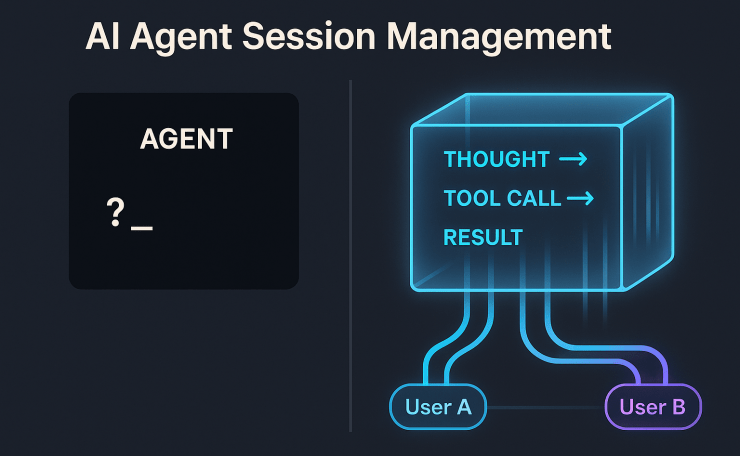
At the heart of this design is the **async generator pattern** in Python. An async generator can `yield` multiple values over time instead of returning just once. By wrapping the agent’s logic in an `async def` function, I emit each reasoning step as a distinct event. For instance: “I think I need to use the ‘add’ tool,” then “Calling ‘add’ with (2, 2),” then “The tool returned 4.”
To deliver these events to the client, I chose Server-Sent Events (SSE). While WebSockets offer powerful bidirectional communication, SSE is a simpler, one-way channel from server to client. In practice, it runs on standard HTTP, works natively in all modern browsers, and handles reconnection automatically. That makes it a perfect, lightweight fit for this kind of “thinking out loud” stream. Furthermore, FastAPI’s `StreamingResponse` integrates seamlessly with async generators, keeping the implementation surprisingly elegant.
The Streaming API Server
Below is a trimmed-down look at the streaming server code. The app loads the agent and tools once at startup to keep things efficient. Specifically, the magic happens in `run_agent_streaming`, the async generator that powers the stream, and the `/chat` endpoint that serves it.
# `api_server.py` (focused on streaming logic)
import asyncio
from fastapi import FastAPI
from fastapi.responses import StreamingResponse
from pydantic import BaseModel

# Assume agent_config is loaded at startup...

app = FastAPI()

class ChatRequest(BaseModel):
    message: str

async def run_agent_streaming(agent_config, message: str):
    """
    An async generator that simulates a streaming agent's thought process.
    The "THOUGHT:" and "INFO:" prefixes here are illustrative, like debug logs.
    In production, you might customize these for structured logging.
    """
    yield "INFO: Agent process started."
    await asyncio.sleep(0.5)

    # Simulate the agent "thinking" and using a tool
    if 'add' in message.lower():
        yield "THOUGHT: The user wants to add. I should use the 'add' tool."
        await asyncio.sleep(0.5)
        # result = agent_config['loaded_tools']['add'](2, 2) # Actual tool call
        yield "RESULT: Tool 'add' returned: 4"
        await asyncio.sleep(0.5)
        yield "FINAL: The result of add(2, 2) is 4."
    else:
        yield "THOUGHT: I will provide a generic response."
        await asyncio.sleep(0.5)
        yield "FINAL: I am a MathAgent. Try asking 'add 2 and 2'."

@app.post("/chat")
async def chat_with_agent(request: ChatRequest):
    """Endpoint supporting streaming responses via Server-Sent Events (SSE)."""
    return StreamingResponse(
        run_agent_streaming(agent_config, request.message),
        media_type="text/event-stream"
    )

# To run: uvicorn api_server:app --reload
While developers might see these raw `INFO:` and `THOUGHT:` logs, a front-end application can parse these markers to create a more polished user experience. For example, a front-end can transform a `THOUGHT:` message into an animated “thinking…” indicator and render a `RESULT:` as a distinct chat bubble, giving the user a clear, engaging view of the agent’s activity.
The Next Hurdle: Handling Parallel Conversations
But transparency alone wasn’t enough—agents also needed to handle multiple users without confusion. FastAPI’s asynchronous nature means it can handle thousands of concurrent requests with ease. I decided to put this to the test. I opened two terminals and simulated two different users, Alice and Bob, talking to the agent simultaneously.
Alice asked, “What is the capital of France?”
A moment later, Bob asked, “How many moons does Mars have?”
As a result, the agent’s stream of consciousness became a garbled mess. It thought about Paris, then immediately jumped to Phobos and Deimos. When Alice asked a follow-up, “And what is its population?”, the agent, whose context was now contaminated by Bob’s query, got confused and tried to find the population of a moon. Sharing a single agent instance meant that parallel requests clashed—User A’s context leaked into User B’s conversation. This wasn’t just a functional bug; it was a critical failure of trust and privacy. The agent needed a way to manage separate conversations. It needed sessions.
Implementing AI Agent Session Management for Contextual Conversations
The solution — the core of AI agent session management — was to introduce a `session_id` for every independent conversation. A session represents a coherent thread of interaction, whether it’s a single user in a chat window or a long-running automated process. When a request comes in, it must carry its `session_id`.
With this ID, the agent can now maintain a separate history for each conversation. This history is crucial. To generate a contextually aware response, an LLM needs the full transcript—every user message, every agent thought, every tool call, and every tool result. Think of it like asking a friend for advice. If you only share the last sentence of your problem, they can’t give a useful answer. Without the full story, the response will be shallow and incorrect.
Initially, I used a simple in-memory Python dictionary, where each key is a `session_id` and the value is a list of conversation events. For a production system, however, this approach has limits. For true persistence, you need a dedicated store like Redis or a database. In production, persistence matters: **resilience** (to survive restarts), **scalability** (to distribute load), and **multi-instance support** (so any server can serve any user).
A Flexible AI Agent Session Architecture with Mixins
As I designed this, I realized that not every agent needs to be conversational. Some agents might be designed for simple, one-off tasks where maintaining history is unnecessary overhead. Forcing session management on every agent would violate the principle of building only what you need.
This is where Python’s mixins provided a beautifully elegant solution. Rather than using complex inheritance or littering my `BaseAgent` with `if self.use_sessions:` flags, I could define capabilities in small, reusable classes. This composable approach lets me snap together capabilities like Lego blocks—sessions here, state there—without cluttering the base design. This way, agents don’t carry unnecessary baggage; they only get the blocks they need for the job. This modularity also simplifies testing—you can verify each mixin independently before composing it into a full agent..
- Why not inheritance? A deep inheritance chain (`StatefulSessionAgent` -> `SessionAgent` -> `BaseAgent`) risks the “fragile base class” problem. In such chains, a change in a parent class ripples through all descendants with unintended consequences. The result is a rigid taxonomy that’s hard to refactor.
- Why not config flags? Adding conditional logic inside the `BaseAgent` for every optional feature makes the code messy and harder to read. Boilerplate checks end up obscuring the core logic.
Instead, mixins avoid both pitfalls. They provide modular functionality you can cleanly compose. I created two:
- `SessionMixin`: Manages the `sessions` dictionary to store conversation histories.
- `StatefulMixin`: Manages a `state` dictionary for the agent to store arbitrary data across requests (useful for tasks that require memory but not necessarily a conversational history).
Here’s how they come together:
class SessionMixin:
    """Manages conversation histories for multiple sessions."""
    def __init__(self):
        self.sessions = {} # In-memory store; could be Redis for scalability

    def get_session_history(self, session_id):
        return self.sessions.get(session_id, [])

    def add_to_session(self, session_id, message):
        if session_id not in self.sessions:
            self.sessions[session_id] = []
        self.sessions[session_id].append(message)

class StatefulMixin:
    """Manages a persistent state for the agent instance."""
    def __init__(self):
        self.state = {}

class BaseAgent:
    """A simple agent that has tools and an LLM."""
    def __init__(self, tools, llm):
        self.tools = tools
        self.llm = llm

# --- Example Composition ---
class StatefulSessionAgent(BaseAgent, SessionMixin, StatefulMixin):
    """An agent that supports both sessions and internal state."""
    def __init__(self, tools, llm):
        BaseAgent.__init__(self, tools, llm)
        SessionMixin.__init__(self)
        StatefulMixin.__init__(self)
Conclusion: Building for Scale
Ultimately, this part of my journey taught me two critical lessons:
- Transparency is a Feature: Streaming is not just a nice-to-have; it’s an essential feature for building trust and providing a superior user experience. It turns the mysterious black box into an interactive partner.
- Context is a Prerequisite for Intelligence: True conversational ability isn’t possible without robust AI agent session management. Sessions are the fundamental mechanism that allows an agent to handle multiple users simultaneously, remembering each conversation’s unique history without getting confused.
By combining streaming for transparency with sessions for context, my simple agent API evolved into a scalable, multi-user service. With those foundations in place, the next challenge was to improve the quality of the agent’s decisions. How do agents decide what to do next? That’s the topic for our next post on the Reasoning Layer.