 Vinodh Ramu
Part 10 of “My Journey in Building Agents from Scratch” — packaging the agent as a Python library and building a self-registration discovery service
The agent worked. It handled product queries, ran ReAct loops, searched by meaning with a vector context tool, and retained session memory. As an AI agent Python library running on my machine, it was genuinely useful.
Then a colleague asked: “Can I use this in my script?”
I paused. The honest answer was: clone my repo, install the dependencies manually, figure out the import structure, and hope nothing conflicts with your environment. That is not a usable answer.
The gap between “works on my machine” and “the team can use it” turned out to be its own engineering problem. This post is about closing that gap — shipping the AI agent Python library the whole team could install — and the second problem that appeared immediately after we did.
Packaging the AI Agent Python Library
The first step was making the agent installable. That meant a proper package structure and a `pyproject.toml`
The decision I had to make was: what do I expose? The internal class hierarchy — ToolAgent, StatefulAgent, ReactAgent, PlanningAgent, StatefulReact, StatefulReactPlan — was not something I wanted every consumer to care about. The public API needed to be simpler.
I found out exactly how confusing it was when I walked a colleague through using the library for the first time. I showed them the import, they looked at the list of classes and asked: “Which one do I use?”. When I explained it depends on whether you need memory, whether you need planning, and whether you want ReAct-style reasoning, they looked at me like I’d just described a research paper. They wanted to point at a YAML file and have something run. They did not want to reason about class composition.
That conversation killed the idea of exposing the class hierarchy. The whole point — for most people — was to not know how the agent worked. They just needed it to work.
I settled on two things:
An importable class — Agent, configured by YAML:
from myagent import Agent

agent = Agent(config="customer_service.yaml")
response = agent.chat("Show me orders above 500 pounds last month")
A CLI — for running an agent as a server without writing any Python:
myagent run --config customer_service.yaml
The CLI was the more useful of the two for most people. Non-engineers on the team could spin up an agent just by pointing at a YAML file. No Python knowledge required.
The pyproject.toml declared the entry point for the CLI and the public Agent class. Everything else — the processor classes, the internal ReAct loop, the tool registry — stayed internal. Consumers do not need to know those exist.
[build-system]
requires = ["setuptools>=68", "wheel"]
build-backend = "setuptools.backends.legacy:build"

[project]
name = "myagent"
version = "1.0.0"
requires-python = ">=3.11"
dependencies = [
    "openai>=1.0",
    "fastapi",
    "uvicorn",
    "psycopg2-binary",
    "sentence-transformers",
    "pyyaml",
    "pandas",
]

[project.scripts]
myagent = "myagent.cli:main"
Building the wheel:
python -m build
# produces dist/myagent-1.0.0-py3-none-any.whl
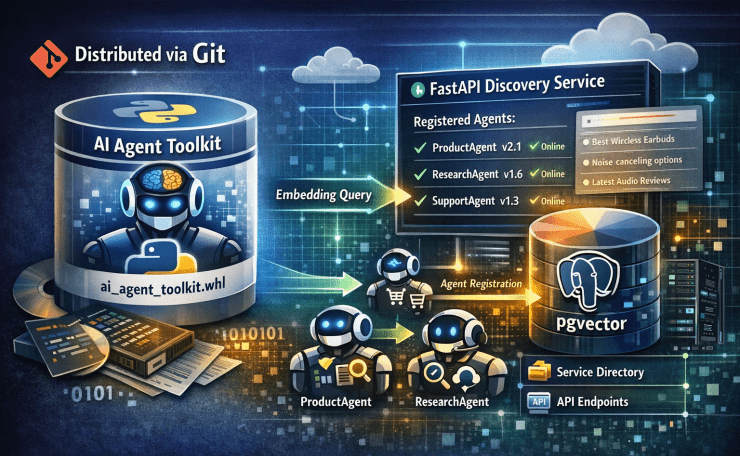
Distributing via Git
I committed the built wheel to the git repo and shared it as a pip install using pip’s VCS support from the repo URL:
pip install "git+https://github.com/org/myagent.git@main#subdirectory=dist&egg=myagent"
Or for a specific version tag:
pip install "git+https://github.com/org/myagent.git@v1.0.0"
No internal PyPI, no Artifactory, no extra infrastructure. The git repo was already access-controlled. Anyone with repo access could install the package with one line.
This was the right call for the team size. When you have ten potential consumers, an internal registry is overhead. When you have a hundred, it becomes necessary. We were not at a hundred yet.
Documenting with MkDocs
I had made a mistake with earlier tools: I documented them for myself. Comments explained implementation decisions, not usage patterns. A colleague shouldn’t need to read source code to understand how to configure an AI agent Python library.
MkDocs forced me to think from the consumer’s perspective. I set it up with a GitHub Actions workflow that runs `mkdocs gh-deploy` on every push to main — nothing to remember, nothing to forget.
The docs site had four pages, all hand-written — nothing auto-generated from docstrings:
Getting Started — install the wheel, verify the Python version, create a minimal YAML, run myagent run --config. Written for someone who has never seen the codebase. Every command is copy-pasteable. No “see the API reference for details” links on this page.
Configuration Reference — every YAML field, its type, its default, and a concrete example of what it controls. This is the page people have open while writing a config. I included a full example YAML at the top so readers could orient themselves before the field-by-field table.
Tools Guide — how to write a tool function, what the function signature must look like, how to register it in the YAML, and what happens at runtime when the agent calls it. This was the most-asked-about page before it existed.
Changelog — one entry per release, what changed, what broke, what to update in existing configs. Teams hate surprise breakage. A changelog prevents most of the “why did this stop working after update?” questions.
The key decision was no auto-generated API reference. Auto-generated docs describe what exists. What consumers needed was how to use it. Those are different documents.
The First User: Python Version Mismatch
The first colleague to install the wheel sent me a message saying it wasn’t working. No error message, just “it’s not working.” We jumped on a call.
Their terminal had a traceback involving a syntax error — the kind Python throws when it encounters code it cannot parse at all. Not a logic error, not a missing dependency, a fundamental parse failure. My first thought was that I’d broken something in the build. I cloned the repo on my machine and it worked fine. That’s when I started asking about their environment.
Python version: 3.9.
The package required Python 3.11. Not because I’d been careful about it — because I’d been using 3.11 features without realising they were version-specific. The pyproject.toml declared requires-python = ">=3.11", which meant pip should have refused to install it. It hadn’t, because they had multiple Python versions and pip had picked the wrong one.
Twenty minutes to figure out that one fact.
This is the most common first-install failure and the easiest to prevent: put the Python version requirement prominently in the Getting Started page, not buried in the pyproject.toml. After that, I added this to the top of the install instructions:
python --version # Must be 3.11 or higher
One line. Saves a 20-minute call.
The Portal Problem: What Is Even Deployed?
A colleague on the frontend team was building an internal portal — a single place where people could see what tools and agents were available across the organisation. Good idea. Then they asked: “How does the portal know which agents are deployed and where?”
I did not have an answer.
My agents were running on various servers, on various ports. I knew where they were. Nobody else did. There was no registry, no inventory, no single source of truth. The portal would need to discover agents somehow.
First Attempt: Scanning Ports
The obvious first move was to scan. Write a service that goes through a list of known hosts and a range of ports, tries to call /health on each one, and records anything that responds.
I built it. It worked in development. Then we ran it against the staging environment and it became immediately obvious why this was wrong:
It was too slow. Scanning a range of ports on multiple hosts, waiting for timeouts on closed ports, took 30–40 seconds. The portal loaded, showed nothing, then slowly populated. That user experience was worse than just having a hardcoded list.
It hit things it had no business touching. I set the port range thinking I knew what was on those servers. I didn’t. The scan lit up half the internal network — databases, monitoring agents, message brokers, things that definitely did not want a /health request arriving from an unknown client. A few of them logged connection errors and paged someone.
When I later tried to use the same port scanning script to find a specific agent I’d just killed and wanted to restart on a different port, it came back with a list of 40 services, none of which was mine but all of which were now in the “discovered agents” list in the portal. That was the moment it was obviously wrong.
It had no metadata. Even when it found a legitimate agent, all it knew was that something was running on that port. It didn’t know the agent’s name, what it could do, or what tools it had. The best I could do was hardcode a port-to-name mapping, which defeated the purpose entirely.
Port scanning is a detection mechanism. It answers “is something running here?” It was the wrong tool for the problem.
The Flip: Agents Register Themselves
The insight that fixed it: instead of the discovery service finding agents, agents announce themselves.
On startup, every agent and MCP server sends a POST to the discovery service with its own details. The discovery service just stores what it receives. The portal reads from the registry — no scanning, no timeouts, no guessing.
Agent starts up
    --> POST /register { name, endpoint, agent_type, tools, version }
    --> Discovery service stores it in SQLite
    --> Portal reads GET /agents
    --> Agent appears in the list
This is a well-known pattern in distributed systems — service registration, used by Consul and Eureka. I arrived at it by building the wrong thing first, which is a better way to understand why it works.
The Discovery Service
The discovery service is a small FastAPI app backed by SQLite. A few people on the team suggested Redis or a Postgres table. I pushed back — the registry is read-heavy, write-light, and small. At any given time it holds maybe 20–30 registrations. SQLite handles millions of reads per day on a laptop. A dedicated database server would be more infrastructure to operate than the problem deserves, and it introduces a dependency that could take down the discovery service if it goes unhealthy.
SQLite also gives you one practical advantage for a registry: the file is portable. If you need to inspect or debug the registry, you open registry.db in any SQLite viewer and see every registered agent. No database client, no credentials, no VPN. That matters when something is wrong at 2am.
Two endpoints. POST /register accepts a JSON payload and writes it to the SQLite table. GET /agents returns everything in the table. That is the entire API.
The one design decision worth highlighting is the upsert:
INSERT INTO agents (name, endpoint, tools, version, registered)
VALUES (:name, :endpoint, :tools, :version, :now)
ON CONFLICT(name) DO UPDATE SET
    endpoint   = excluded.endpoint,
    tools      = excluded.tools,
    version    = excluded.version,
    registered = excluded.registered
name is the primary key. Re-deploying an agent — or restarting it on a new port — updates the existing row rather than creating a second one. No duplicate entries, no stale records from old deployments. The registry always reflects the current state of whatever registered last.
The Registration Payload
The registration payload comes from the agent’s YAML config — everything except the system prompt, which stays internal.
# Inside the agent startup code
import yaml, requests

def register_with_discovery(config_path: str, endpoint: str):
    config = yaml.safe_load(open(config_path))
    payload = {
        "name":       config["name"],
        "agent_type": config["agent_type"],
        "endpoint":   endpoint,
        "tools":      config.get("tools", []),
        "version":    config.get("version", "1.0.0"),
    }
    try:
        requests.post("http://discovery-service:9000/register", json=payload, timeout=3)
    except Exception:
        pass   # Registration failure should not prevent the agent from starting
That try/except matters. If the discovery service is down when an agent starts, the agent should still start. Discovery is a convenience feature, not a dependency.
The Secrets Problem: Whose API Key?
Once the library was in team hands, a new problem surfaced quickly. Different teams used different LLM providers or had their own Azure OpenAI deployments with their own endpoints and API keys. Nobody wanted to hand their credentials to me and have them baked into a shared YAML in a git repo.
I had been putting connection strings and API keys in environment variables, which was better than hardcoding them. But now I was asking each team to manage their own .env files and make sure they were set before running a deploy. That was error-prone and still meant keys were sitting in plaintext somewhere.
The teams were already using AWS Secrets Manager for other services. The obvious solution: let the YAML reference a secret path instead of a value, and have the library resolve it at deploy time.
The config pattern:
model:
  provider: azure_openai
  endpoint: ${secret:myteam/agents/azure-endpoint}
  api_key:  ${secret:myteam/agents/azure-api-key}
  deployment: gpt-4o
The ${secret:path} syntax tells the library: before starting the agent, fetch this value from AWS Secrets Manager and inject it. No key ever appears in the YAML file. The YAML can be committed to git. The value only exists in memory at runtime.
The resolver walks the config dict recursively and replaces every ${secret:...} string with the value fetched from AWS Secrets Manager:
def resolve_secrets(config):
    if isinstance(config, dict):
        return {k: resolve_secrets(v) for k, v in config.items()}
    if isinstance(config, str):
        return re.sub(
            r"\$\{secret:([^}]+)\}",
            lambda m: boto3.client("secretsmanager")
                          .get_secret_value(SecretId=m.group(1))["SecretString"],
            config,
        )
    return config
This runs before resolve_env_vars() from Post 9 — the same pattern, one layer deeper. The agent starts with a fully resolved config. No credentials anywhere on disk.
Two things made this work cleanly:
IAM role-based access. Each deployed agent runs under an IAM role that has secretsmanager:GetSecretValue permission scoped to its own secret paths only. The customer service agent can read myteam/customer-service/*. It cannot read finance/agents/*. No shared credentials, no overly permissive service accounts.
The system prompt stays local. Teams were initially nervous about what the library sent to the discovery service. The registration payload includes name, endpoint, tools, version — everything needed to find and use the agent. The system prompt — which often contained business logic, tone guidelines, and proprietary instructions — never left the local config. This was a deliberate design decision and the right one.
What the AI Agent Python Library Unlocked
With the discovery service running, the React portal had a clean GET /agents endpoint to read from. No scanning, no hardcoded lists, no manual updates. Any agent that registered itself appeared in the portal automatically.
The system now had a clear lifecycle:
- Develop the agent locally using the installed wheel
- Deploy it with
myagent run --config agent.yaml - On startup, the agent POSTs to
/register - The portal reads
/agentsand shows the new entry
Adding a new agent to the organisation’s toolkit became: deploy it and it’s there.
But the thing I hadn’t anticipated was what this changed about how teams thought about agents. Before, asking “can you build an agent for this?” was asking me personally to do it and then somehow wire it into whatever shared tooling existed. After, it was a question about YAML files and deployment. It separated “building an agent” from “the person who built the framework”. Teams started writing their own configs and deploying them without involving me at all.
That was the actual goal of the AI agent Python library — I just hadn’t stated it clearly. You know you’ve built a library when people use it to do things you didn’t design for.
Key Takeaways
- AI agent Python library works best with two public APIs — an importable class and a CLI — covering both developer and non-developer consumers
- Git distribution is sufficient for team-internal wheels; no artifact registry needed until scale demands it
- Document for consumers, not for yourself — what import, what YAML field, what command; not how the internals work
- Put the Python version requirement first in the getting started guide, not in the pyproject.toml footnotes
- Port scanning answers the wrong question. “Is something running here?” is not the same as “what agents do we have?”
- The right model: agents announce themselves; the discovery service records what it’s told; the portal reads the record
- Registration should never block startup. If the discovery service is unavailable, the agent still runs
Try It Yourself
- [ ] Create a
pyproject.tomlwith a[project.scripts]entry, build withpython -m build, and install the wheel in a fresh virtualenv - [ ] Add a
myagent run --configCLI command usingargparsethat reads the YAML and starts the FastAPI server - [ ] Set up MkDocs with GitHub Actions deployment — write a getting started page from the perspective of someone who has never seen the codebase
- [ ] Build the discovery service from the snippet above and verify
GET /agentsreturns an empty list before any agent is deployed - [ ] Add a
register_with_discovery()call to agent startup and confirm the agent appears inGET /agentsafter boot - [ ] Restart the agent on a different port — verify the registry entry updates rather than duplicates
- [ ] Simulate a discovery service outage (kill the process) and verify the agent still starts successfully