 Vinodh Ramu
Part 7 of “My Journey in Building Agents from Scratch” — building an AI agent planning module
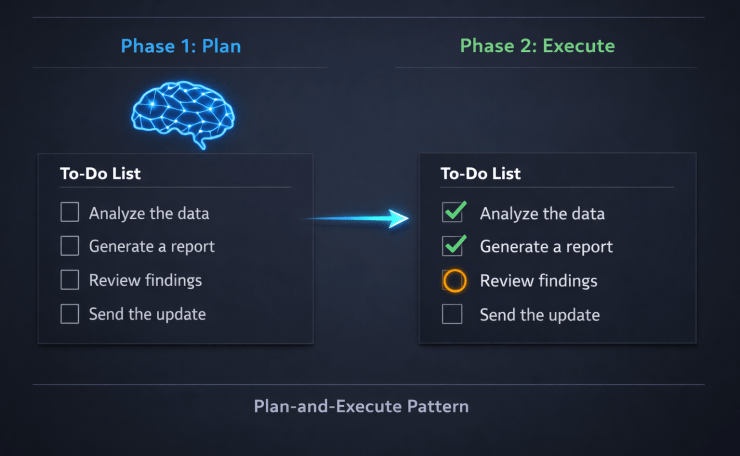
AI agent planning module: two-phase plan-then-execute flow showing step list with status
The reasoning layer from Part 6 gave my agent the ability to evaluate each step as it went. That was a major leap. But watching it work on a multi-step task still felt like watching someone solve a puzzle behind a curtain — I could see the final answer, I just had no idea how it got there. This post is about building the AI agent planning module: the mechanism that lets an agent lay out its full plan before it starts, and track each step to completion as it executes.
The Task That Exposed the Gap
After the reasoning layer was working, I wanted to test the agent on a problem with a known correct order: a BODMAS expression.
BODMAS — Brackets, Orders (powers), Division, Multiplication, Addition, Subtraction — defines the exact sequence in which a mathematical expression must be solved. It is unambiguous. There is one right order, and if you deviate from it, you get the wrong answer.
I built a math agent with four tools:
def add(a: float, b: float) -> float:      return a + b
def subtract(a: float, b: float) -> float: return a - b
def multiply(a: float, b: float) -> float: return a * b
def divide(a: float, b: float) -> float:   return a / b
Then I gave it this expression:
Solve: 2 + 3 × 4 − 6 ÷ 2
The agent solved it correctly. The answer came back as 11. That is right — 3 × 4 = 12, 6 ÷ 2 = 3, then 2 + 12 − 3 = 11.
But I had no idea how it got there. Did it multiply before adding? Did it do the division first? Did it happen to get the right answer for the wrong reasons? I could not tell. The agent was a black box.
That was the problem. Not the answer — the absence of the working.
Streaming Was Not Enough
In Part 2, I had added streaming so the agent’s response appeared word by word. That made the output feel alive. But streaming the final answer is not the same as watching the agent think. Streaming tells you what the agent said. It does not tell you what the agent did.
What I wanted was something more like a progress report:
[ ] Step 1: Multiply 3 × 4
[ ] Step 2: Divide 6 ÷ 2
[ ] Step 3: Add 2 + 12
[ ] Step 4: Subtract 14 − 3
And then, as each step ran:
[✅] Step 1: Multiply 3 × 4  → 12
[✅] Step 2: Divide 6 ÷ 2    → 3
[⏳] Step 3: Add 2 + 12
[ ] Step 4: Subtract 14 − 3
I had seen exactly this in VS Code Copilot’s agent mode — a live todo list, updated as each action completed. It made the agent’s work transparent. You could see what it planned, what it had done, and what was still left. That was the experience I wanted to replicate for my own AI agent planning module.
The Fundamental Shift: Plan First, Then Execute
Up to this point, my agent’s loop was reactive: receive input → pick a tool → observe the result → repeat. The ReAct loop from Part 6 made this smarter by adding self-evaluation between steps. But it was still single-step thinking. Each iteration only knew about the last tool result. It had no concept of the full journey.
The planning approach flips this:
- Phase 1 — Plan: Ask the LLM to decompose the entire task into ordered steps before executing anything. Store the result.
- Phase 2 — Execute: Work through the plan step by step, marking each one complete as it finishes.
This is known as the Plan-and-Execute pattern — the structural backbone of any AI agent planning module — and I arrived at it the same way I arrived at ReAct: by building something that worked and then reading about it afterward.
The key insight is that planning and execution are separate concerns. Mixing them — letting the agent decide what to do next while also doing it — is efficient but opaque. Separating them gives you observability for free: the plan is visible before a single tool is called.
Building the AI Agent Planning Module: The PlanningMixin
Following the same mixin architecture from the previous posts, I created a PlanningMixin with one core responsibility: ask the LLM to generate a step-by-step plan, store it as a structured dictionary, and provide methods to track and display step completion. This is the heart of the AI agent planning module.
import json
import re


class PlanningMixin:
    """
    Adds a two-phase plan-then-execute capability to any agent.
    Phase 1: Ask the LLM to decompose the task into ordered steps.
    Phase 2: Execute each step in sequence, tracking status in a dictionary.
    """

    def generate_plan(self, user_task: str) -> dict:
        """
        Calls the LLM once to decompose the task into a structured step list.
        Returns a dictionary with each step's id, description, tool, args, and status.
        Do not hardcode intermediate values — reference previous steps by id.
        """
        planning_prompt = f"""Decompose the following task into ordered steps that an agent can execute using tools.
Return ONLY a valid JSON object in this exact format:
{{
  "steps": [
    {{
      "id": 1,
      "description": "Human-readable description of this step",
      "tool": "tool_name",
      "args": {{"arg1": value1, "arg2": {{"step_result": previous_step_id}}}},
      "status": "pending",
      "result": null
    }}
  ]
}}
Rules:
- Each step must use exactly one tool.
- Steps must be in correct execution order.
- Do NOT hardcode intermediate values. If a step depends on a previous result,
  write {{"step_result": step_id}} as the argument value.

Task: {user_task}
"""
        response = self.llm.chat([{"role": "user", "content": planning_prompt}])
        return self._extract_json(response.content)

    def update_step(self, plan: dict, step_id: int, status: str, result=None):
        """Marks a step's status and optionally records its result."""
        for step in plan["steps"]:
            if step["id"] == step_id:
                step["status"] = status
                if result is not None:
                    step["result"] = result
                break

    def display_plan(self, plan: dict):
        """Prints the current state of the plan to the console."""
        print("\n--- Plan Status ---")
        for step in plan["steps"]:
            if step["status"] == "done":
                icon = "✅"
                suffix = f"  → {step['result']}"
            elif step["status"] == "in_progress":
                icon = "⏳"
                suffix = ""
            else:
                icon = "⬜"
                suffix = ""
            print(f"  {icon} Step {step['id']}: {step['description']}{suffix}")
        print("-------------------\n")

    def _extract_json(self, text: str) -> dict:
        """Strips markdown code fences if present, then parses JSON."""
        text = re.sub(r"```json\s*|\s*```", "", text).strip()
        return json.loads(text)

    def _resolve_args(self, args: dict, results: dict) -> dict:
        """
        Replaces step references in tool args with actual results.
        e.g. {"a": {"step_result": 1}} becomes {"a": 12.0}
        """
        resolved = {}
        for key, value in args.items():
            if isinstance(value, dict) and "step_result" in value:
                resolved[key] = results[value["step_result"]]
            else:
                resolved[key] = value
        return resolved


class MathAgent(BaseAgent, PlanningMixin):
    """
    A math agent that solves expressions using BODMAS order.
    Generates a full plan upfront, then executes each step with live status updates.
    """

    def run(self, expression: str) -> str:
        # Phase 1: Generate the full plan before executing anything
        plan = self.generate_plan(
            f"Solve this expression using BODMAS rules: {expression}"
        )
        print("Plan generated:")
        self.display_plan(plan)

        # Phase 2: Execute each step in order, tracking intermediate results
        accumulated_results = {}

        for step in plan["steps"]:
            self.update_step(plan, step["id"], "in_progress")
            self.display_plan(plan)

            tool_name = step["tool"]
            tool_args = self._resolve_args(step["args"], accumulated_results)

            result = self.tools[tool_name](**tool_args)
            accumulated_results[step["id"]] = result

            self.update_step(plan, step["id"], "done", result)

        self.display_plan(plan)

        final_step = plan["steps"][-1]
        return f"Result: {final_step['result']}"
A few design decisions worth calling out:
- The plan is generated in a single, dedicated LLM call. This is entirely separate from the execution loop. The agent commits to a full plan before touching any tool.
- Steps are stored as a list of dictionaries, each carrying
id,description,tool,args,status, andresult. This gives you a complete record of what the agent intended and what actually happened. _resolve_argshandles step dependencies. When step 3 needs the result of step 1, the LLM encodes that as{"step_result": 1}. The resolver substitutes it with the real computed value before the tool is called.display_planis called before and after each step. This produces the live todo-list experience — the full plan appears upfront, then updates tick through one by one._extract_jsonhandles a common LLM quirk. Models often wrap JSON in markdown code fences. The helper strips these before parsing, making the code robust without needing a more complex output parser.
The BODMAS Agent in Action
Given 2 + 3 × 4 − 6 ÷ 2, the output now looks like this:
Plan generated:
--- Plan Status ---
  ⬜ Step 1: Multiply 3 × 4
  ⬜ Step 2: Divide 6 ÷ 2
  ⬜ Step 3: Add 2 + result of step 1
  ⬜ Step 4: Subtract result of step 3 − result of step 2
-------------------

--- Plan Status ---
  ⏳ Step 1: Multiply 3 × 4
  ⬜ Step 2: Divide 6 ÷ 2
  ⬜ Step 3: Add 2 + result of step 1
  ⬜ Step 4: Subtract result of step 3 − result of step 2
-------------------

--- Plan Status ---
  ✅ Step 1: Multiply 3 × 4          → 12.0
  ⏳ Step 2: Divide 6 ÷ 2
  ⬜ Step 3: Add 2 + result of step 1
  ⬜ Step 4: Subtract result of step 3 − result of step 2
-------------------

... (steps 3 and 4 complete in the same way)

--- Plan Status ---
  ✅ Step 1: Multiply 3 × 4          → 12.0
  ✅ Step 2: Divide 6 ÷ 2            → 3.0
  ✅ Step 3: Add 2 + 12              → 14.0
  ✅ Step 4: Subtract 14 − 3         → 11.0
-------------------

Result: 11.0
Same answer as before — but now you can see every step. You can verify the order was correct. You can pinpoint exactly where a wrong answer would have come from. The agent is no longer a black box.
What Changed — And What Didn’t
The planning module did not make the agent smarter. It made it legible.
The reasoning layer from Part 6 gives the agent intelligence at each decision point. The planning module gives you a window into those decisions before they happen and a record of them after they complete. These are complementary — one improves what the agent does, the other improves what you can see.
One observation worth noting: once the plan was generated, the agent rarely needed the ReAct evaluation loop for structured tasks like BODMAS. The steps were deterministic — there was no ambiguity about whether a result “answered the question.” The reasoning loop is most valuable for open-ended tasks where tool results may be incomplete. The planning loop is most valuable for structured, known-order tasks.
Real-world agents need both.
When You Already Know the Plan
The LLM-generated plan works well for dynamic tasks where the sequence is unknown upfront. But for recurring, well-understood workflows — like always solving BODMAS in the same order — generating the plan through the LLM on every run felt wasteful. Worse, it added a point of failure: the LLM might hallucinate a different step order across runs, giving you inconsistent results for identical inputs.
The question I landed on: why should the agent always decide the plan, when I already know what the plan should be?
The same YAML file I was already using to configure agent input parameters got a new optional section: workflow_sequence. If it is present, the agent loads it directly as the plan. If it is absent, the agent falls back to LLM-generated planning as before.
The YAML Structure
Each step in workflow_sequence declares its type and just enough information for the LLM to execute it — not the args themselves. The LLM already has the full conversation history (every previous step result) by the time it executes a step, so it can infer the right values. The YAML provides the structure; the LLM provides the execution intelligence.
To illustrate why this matters, I switched to a different scenario: a weekly product health report. Every Monday, the same pipeline runs — fetch sales data, fetch return rates, reason about what the numbers mean, check inventory, then compile an executive summary. The steps never change. Only the data does. This is exactly the kind of workflow you should never be asking an LLM to plan.
Three step types:
workflow_sequence:
  # tool_call: names the tool, LLM decides the args from conversation history
  - id: 1
    type: tool_call
    tool: fetch_sales_data
    description: "Fetch this week's sales figures for all product categories"

  - id: 2
    type: tool_call
    tool: fetch_return_rates
    description: "Fetch product return rates for the same period"

  # reasoning: LLM reflects on history and produces a text result
  - id: 3
    type: reasoning
    description: "Based on the sales and return data, identify which categories are underperforming and why"

  - id: 4
    type: tool_call
    tool: fetch_inventory_levels
    description: "Fetch current inventory levels for the underperforming categories identified in step 3"

  # aggregate: LLM combines results from specified step ids into a final answer
  - id: 5
    type: aggregate
    inputs: [1, 2, 3, 4]
    description: "Compile a concise executive summary covering performance, issues, inventory risk, and recommended actions"
This separation is intentional. The YAML defines what each step does and in what order. The LLM — which already knows the original expression and every prior step result — decides how to call the tool at each step. No hardcoded args, no brittle step references. Just structure.
Loading and Executing a YAML Workflow
The PlanningMixin gets two new methods: one to load the YAML into the same step-dictionary format the existing execute loop already understands, and one to execute each of the three step types.
import yaml


class PlanningMixin:
    # ... existing methods from above ...

    def load_plan_from_yaml(self, path: str) -> dict | None:
        """
        Reads workflow_sequence from a YAML config file.
        Returns a plan dict in the same format as generate_plan().
        Returns None if workflow_sequence is not present.
        """
        with open(path) as f:
            config = yaml.safe_load(f)

        sequence = config.get("workflow_sequence")
        if not sequence:
            return None

        return {
            "steps": [
                {
                    "id": step["id"],
                    "type": step["type"],
                    "description": step.get("description", ""),
                    "tool": step.get("tool"),          # only for tool_call
                    "inputs": step.get("inputs", []),  # only for aggregate
                    "status": "pending",
                    "result": None,
                }
                for step in sequence
            ]
        }

    def execute_step(self, step: dict, messages: list) -> any:
        """
        Executes a single step based on its type.
        All three types use the full message history — the LLM always has
        context about every previous step result before making a decision.
        """
        step_type = step["type"]

        if step_type == "tool_call":
            # Tell the LLM which tool to use; it decides the args from history
            prompt = (
                f"Execute the next step: {step['description']}. "
                f"You must call the '{step['tool']}' tool. "
                f"Determine the correct arguments from the conversation history."
            )
            messages.append({"role": "user", "content": prompt})
            response = self.llm.chat(messages, tools=self.tools)
            tool_args = response.tool_call.arguments
            return self.tools[step["tool"]](**tool_args)

        elif step_type == "reasoning":
            # LLM reflects on conversation history and returns a text result
            prompt = (
                f"Based on all previous steps, reason about the following: "
                f"{step['description']}"
            )
            messages.append({"role": "user", "content": prompt})
            response = self.llm.chat(messages)
            return response.content

        elif step_type == "aggregate":
            # LLM combines the specified previous step results into a final answer
            prompt = (
                f"Using the results from steps {step['inputs']}, "
                f"{step['description']}"
            )
            messages.append({"role": "user", "content": prompt})
            response = self.llm.chat(messages)
            return response.content

        raise ValueError(f"Unknown step type: {step_type}")
The agent’s run method checks for a YAML workflow first. In the product report agent this looks like:
class ProductReportAgent(BaseAgent, PlanningMixin):

    def run(self, task: str, config_path: str = None) -> str:
        messages = [{"role": "user", "content": task}]

        # Use static YAML workflow if provided, otherwise ask LLM to generate plan
        plan = None
        if config_path:
            plan = self.load_plan_from_yaml(config_path)

        if plan is None:
            plan = self.generate_plan(task)

        print("Plan loaded:" if config_path and plan else "Plan generated:")
        self.display_plan(plan)

        for step in plan["steps"]:
            self.update_step(plan, step["id"], "in_progress")
            self.display_plan(plan)

            result = self.execute_step(step, messages)

            # Add the result to conversation history so subsequent steps can use it
            messages.append({
                "role": "assistant",
                "content": f"Step {step['id']} result: {result}"
            })

            self.update_step(plan, step["id"], "done", result)

        self.display_plan(plan)
        return str(plan["steps"][-1]["result"])
LLM-Generated vs. YAML-Defined: When to Use Each
| LLM-generated plan | YAML workflow | |
|---|---|---|
| When to use | Unknown or dynamic task sequences | Known, repeatable workflows |
| Step ordering | LLM decides | You decide |
| Arg resolution | LLM decides (via _resolve_args) | LLM decides (via conversation history) |
| Consistency | May vary across runs | Same structure every run |
| Auditability | Plan visible after LLM call | Plan visible in source YAML |
| Extra LLM call | Yes — one call just for planning | No — planning has zero LLM cost |
The YAML approach is not a replacement for LLM planning — it is a specialisation of it. Both still rely on the LLM to handle execution details. The difference is who decides the shape of the plan. For well-understood workflows, that decision belongs to you.
Running the product report agent with the YAML above produces:
Plan loaded:
--- Plan Status ---
  ⬜ Step 1: Fetch this week's sales figures for all product categories
  ⬜ Step 2: Fetch product return rates for the same period
  ⬜ Step 3: Based on the sales and return data, identify which categories are underperforming and why
  ⬜ Step 4: Fetch current inventory levels for the underperforming categories identified in step 3
  ⬜ Step 5: Compile a concise executive summary covering performance, issues, inventory risk, and recommended actions
-------------------

--- Plan Status ---
  ✅ Step 1: Fetch this week's sales figures...        → {"Electronics": 142000, "Apparel": 38000, ...}
  ✅ Step 2: Fetch product return rates...             → {"Electronics": "3%", "Apparel": "18%", ...}
  ✅ Step 3: Identify underperforming categories...    → "Apparel has elevated returns (18%) vs 5% benchmark..."
  ✅ Step 4: Fetch inventory levels...                 → {"Apparel": {"stock": 4200, "weeks_cover": 11}, ...}
  ⏳ Step 5: Compile executive summary...
-------------------

--- Plan Status ---
  ✅ Step 1 ... ✅ Step 2 ... ✅ Step 3 ... ✅ Step 4 ...
  ✅ Step 5: Compile executive summary                 → "This week Apparel underperformed..."
-------------------
The same five steps run every Monday. The LLM never plans — it only executes. Any team member reading the YAML knows exactly what the agent does and in what order, before a single line of Python is read.
Pitfalls Building an AI Agent Planning Module
1. The LLM Sometimes Hardcodes Intermediate Values
In early runs, the LLM would generate a plan where step 3 looked like this:
{"tool": "add", "args": {"a": 2, "b": 12}}
Instead of:
{"tool": "add", "args": {"a": 2, "b": {"step_result": 1}}}
It was anticipating step 1’s result at plan time rather than referencing it. This made the plan brittle — if step 1 returned something different, step 3 would still add 2 + 12 regardless. The fix was to make the prompt explicit: “Do not hardcode intermediate values. Reference previous steps using {"step_result": step_id}.”
2. The Plan Can Become Stale
If a tool fails mid-execution or returns an unexpected result, the remaining steps may no longer be valid. The PlanningMixin as shown does not handle replanning — it commits to the initial plan and pushes through. For production use, you need a decision point after each step: is the plan still viable, or do we need to revise it? This is where an AI agent planning module and a reasoning layer genuinely need to work together — the reasoning loop evaluates whether to stay on plan or replan. The LangChain Plan-and-Execute agent implements exactly this kind of replanning hook if you want a reference implementation.
3. The JSON Parsing Problem
LLMs occasionally return JSON wrapped in markdown code fences (```json ... ```), which breaks json.loads() outright. The _extract_json helper strips those fences before parsing. Small fix, but without it the planning step will fail silently on a subset of LLM responses and be difficult to debug.
Key Takeaways
- A reasoning loop gives an agent intelligence at each step. A planning module gives you visibility across all steps.
- The Plan-and-Execute pattern — generate the full plan first, then execute in sequence — separates intent from action and makes the agent’s behavior legible before it starts.
- Storing the plan in a step dictionary with status tracking turns an opaque execution into an auditable trace.
- The
_resolve_argspattern lets steps reference previous results without the LLM needing to know the actual values at plan time. - Planning and reasoning are complementary. Planning excels on structured, ordered tasks. Reasoning excels on open-ended tasks where tool results are ambiguous.
- The
workflow_sequenceYAML section lets you define the plan structure yourself for known workflows — no LLM call needed for planning, and the sequence is consistent every run. - Three step types cover most needs:
tool_call(name the tool, LLM picks args from history),reasoning(LLM reflects and produces text),aggregate(LLM combines prior results). The LLM always has full conversation history at each step.
Try It Yourself
- [ ] Build the four-tool math agent and test it without planning — then add
PlanningMixinand compare the output - [ ] Try a more complex expression with brackets and observe whether the agent honours them in its plan
- [ ] Deliberately break the
_resolve_argsstep reference and see what happens to the final answer - [ ] Extend
display_planto stream status updates over a web API instead of printing to console - [ ] Add a replanning step: after each tool result, ask the LLM whether the plan needs to be revised
- [ ] Combine
PlanningMixinandReasoningMixinin one agent — observe which tasks benefit from one vs. the other - [ ] Write a
workflow_sequenceYAML for a multi-step task you know well and run it — compare the output to the LLM-generated plan for the same task - [ ] Add a
reasoningstep between twotool_callsteps and observe what the LLM produces when given full conversation history
Conclusion
Adding the AI agent planning module was one of the smaller code changes in this series — but one of the biggest shifts in how the agent felt to work with. The math agent had always been solving BODMAS expressions correctly. The PlanningMixin just made that process visible: a full todo list generated upfront, live step tracking as execution ran, and a complete record at the end.
Getting there required a clean separation: one LLM call to plan, a separate loop to execute. Each step’s status lives in a dictionary that the agent updates as it works. The result is an agent that doesn’t just produce an answer — it shows you the path it took to get there.
But letting the LLM generate the plan every time felt like giving up control for tasks you already understand. The workflow_sequence YAML section closes that gap: define the structure yourself, let the LLM handle the execution intelligence at each step, and get a plan that is consistent, auditable, and costs nothing extra to generate. Dynamic tasks get LLM planning. Predictable workflows get YAML planning. The execute loop handles both without knowing the difference.
The reasoning layer taught the agent to evaluate each step. The planning module taught it to lay out all the steps before starting. The two patterns work at different levels of abstraction, and the next challenge is combining them into a single agent that can handle both structured and open-ended tasks — along with a much richer toolkit.
That’s what comes next.

This is a really solid and helpful article. The whole website deserves praise.
This article is very good and nicely detailed.
The site is useful for anyone interested in learning.інформує