 Vinodh Ramu
Part 11 of “My Journey in Building Agents from Scratch” — building a React portal where teams can discover agents, try them against real use cases, and see what’s happening inside them
The discovery service from Post 10 gave us a clean GET /agents endpoint. Every deployed agent was in the registry. We had, finally, a complete inventory of what existed.
Nobody used it.
The endpoint returned JSON. JSON is for machines, or for engineers willing to curl something on a Friday afternoon to understand what it returns. The teams who most needed to find agents — product managers exploring what was possible, junior engineers looking for tools they didn’t know existed — weren’t going to hit a JSON endpoint. They needed a UI.
That’s where the AI Agent portal started. It grew into something larger.
What the AI Agent Portal Needed to Do
I asked the frontend colleague who’d originally raised the “how does the portal know what’s deployed?” question what they actually wanted people to be able to do.
Three things came back:
See what’s available. Each agent as a card — name, what it does, what tools it has. Not a wall of JSON; something you can scan in 30 seconds.
Try it before committing. Not reading docs about an agent, not asking the person who built it — actually chat with it. See how it responds to your kind of question. Decide if it’s useful before writing a single line of integration code.
Take the endpoint away. Once you’ve decided it’s the right agent, copy the URL and go integrate. Nothing to ask, nothing to wait for.
Underneath this was a subtler problem: teams had very different use cases. An agent built for the customer service team wasn’t obviously useful to the finance team until someone in finance had chatted with it and discovered it could answer inventory questions as well. The portal was meant to make those discoveries happen.
Building It in React
I didn’t start in React. I started with plain HTML and JavaScript — a single file, a fetch call to `GET /agents`, some divs rendered with `innerHTML`. It worked well enough to prove the concept for an agent portal: cards loaded, the chat panel appeared, messages went back and forth.
Then the frontend colleague who’d originally asked “how does the portal know what’s deployed?” saw it and offered to help properly. He was a React developer. He looked at the HTML file, said “this will fall apart the moment you need state in two places at once,” and rebuilt it.
He was right within about a week. The chat panel needed to stay alive while navigating between agent cards. Keeping the event stream panel updated meant avoiding whole-page re-renders. The session ID needed to persist per tab across navigation. Every one of those hit a wall in the HTML version and would have needed a framework anyway. Getting a React developer involved early saved a second rewrite.
The structure was straightforward. On load, the portal calls the discovery service:
GET http://discovery-service:9000/agents
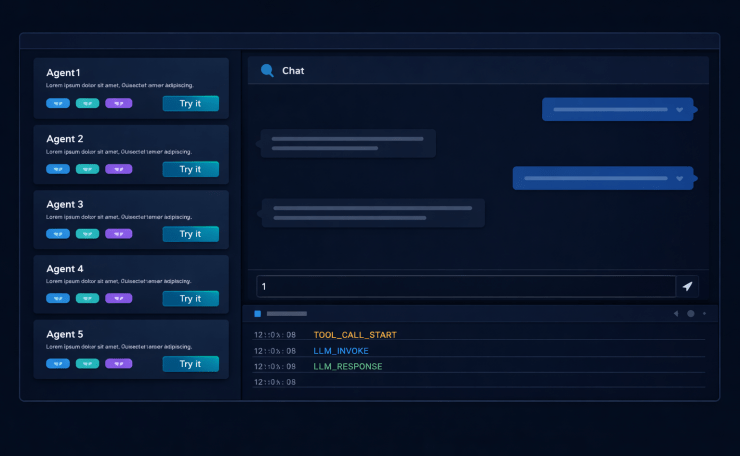
It gets back a list of registered agents. It renders each as a card. The card shows the agent’s name, type, the tools it has registered, the version, and a “Try it” button. A “Copy endpoint” button sits in the corner.
Each “Try it” click opens a chat panel on the right. The panel is scoped to that agent: messages go to POST {agent.endpoint}/chat, responses come back, history accumulates in component state.
Session Isolation
This one was free. The stateful agent we built in Post 5 already stored conversation history by `session_id`. Multiple sessions running simultaneously was already a solved problem — we had designed the agent for it.
The agent portal just needed to generate a session_id per browser tab and include it in every request:
{
  "message": "Show me returns from last quarter",
  "session_id": "portal-7f3a2b"
}
We seeded it from `crypto.randomUUID()` in the browser and stored it in sessionStorage — so refreshing the tab starts a fresh conversation, but navigating between agents in the same tab preserves the session for each one. Tab A and Tab B could chat with the same agent simultaneously without any interference, because that was already how the agent worked. The portal was just the first client that exercised it with multiple users at once.
The “Try Your Own Use Case” Problem
Here’s what we thought would happen: people would use the portal to try the built-in demo queries, confirm the agent worked, and then take the endpoint away to integrate.
Here’s what actually happened: teams wanted to try *their own* use cases, not the demos. The finance team didn’t want to test the customer service agent with a customer service question. They wanted to throw a finance question at it and see what happened. Sometimes it answered sensibly. Other times it failed in ways that revealed the agent was wrong for their purpose. Sometimes it answered a question it wasn’t designed to answer, and that was more useful than anything in the docs.
The agent portal stopped being a “try before you integrate” surface and became a testbed. Teams would spend half an hour in the chat panel before they’d even read the configuration reference. The documentation ended up being what people consulted after they’d already decided to use an agent — to understand how to configure it for their context, not to decide whether to use it at all.
That inversion was unexpected and, in retrospect, obvious. People learn by doing, not by reading. The portal just gave them a place to do.
The Monitoring Gap
Weeks after the portal launched, a pattern started appearing in Slack. Someone would try an agent in the portal, it would respond correctly, but it would take 15–20 seconds. The message in Slack was always a variation of: “Is the agent slow, or is it something else?”
The agents were deployed and the API was responding. But “responding” is not the same as “healthy.” The agent portal gave us no visibility into what was happening inside the agent during a request. Was the LLM taking 18 seconds to respond? Was a database tool timing out and retrying? Was the ReAct loop running too many rounds before settling on an answer? Nobody knew. The response came back eventually and that was all we could see.
We’d been flying blind on agent internals.
Socket.io Streaming Events
The solution we built was an event stream. Each agent already had logging at key points — tool call start, tool call end, LLM invocation, LLM response, loop iteration. We exposed those logs as Socket.io events during live requests.
The AI agent portal opened a Socket.io connection to a monitoring endpoint on each agent. While a chat request was in flight, events streamed back in real time:
[12:34:01.002] tool_call_start   get_recent_orders  {"customer_id": 4821}
[12:34:01.847] tool_call_end     get_recent_orders  845ms  3 results
[12:34:01.851] llm_invoke        messages=4  tokens_est=312
[12:34:03.201] llm_response      tokens=87   1350ms
[12:34:03.204] loop_end          rounds=1
The portal rendered these in a collapsible panel below the chat. You could see exactly where the time was going.
We added two filters. First, by agent — if you had multiple agents open in different tabs, the event panel only showed events for the active one. Second, by session — you saw only the events for your current conversation, not everyone else’s requests hitting the same agent.
The second filter mattered more than the first. Without session filtering, the event panel was noise: a stream of tool calls from four simultaneous users, none of which corresponded to the message you’d just sent. With session filtering, it became a diagnostic tool.
The Admin Panel
As more teams started building agents, a new problem emerged. The portal made it easy to discover and try agents, which was good. But it also made it easy to want to build one, submit it, and have it deployed — which wasn’t always the right answer.
People started bringing agents to us for things that didn’t need agents at all. A simple scheduled report. There was the static lookup that could have been a spreadsheet. One team wanted to wrap two lines of Python and a cron job in an agent. When you give teams the ability to build agents, some of them will reach for an agent regardless of whether the problem calls for one.
The admin panel was the approval gate before any agent went live. Teams submitted their YAML config and tool files. An admin reviewed them — is this agent actually needed? Is it using the shared MCP servers and tools that already exist, or has the team reimplemented something from scratch? Does the tool list make sense for the declared purpose? Is the system prompt doing something the framework isn’t designed to support?
Only after that review did the admin trigger the deployment. Teams couldn’t deploy their own agents. That constraint was intentional.
It meant every agent in the portal had passed review by someone who understood the framework. The discovery registry wasn’t just a list of things that were running — it was a list of things that were supposed to be running. That distinction mattered more as the number of teams grew.
The rejection conversation also turned out to be useful. When we told a team “this doesn’t need an agent, here’s a simpler approach,” it was often the first time anyone had asked whether an agent was the right tool for that specific problem. The admin review created a forcing function for that question.
What This Changed
The portal started as a UI wrapper around a JSON endpoint. By the time it was fully built, it had become three different things depending on who was using it.
For teams discovering agents for the first time, it was a testbed. Not documentation, not a spec — a place to type a real question and see whether the agent handled it. Half an hour in the chat panel told them more than an afternoon of reading would have.
Engineers debugging a slow or unexpected response found the event stream turned a black box into something legible. Tool call timings, LLM invocations, loop counts — things previously buried in server logs were now visible in the same window where they were asking questions.
For the platform team, the admin panel made the framework’s purpose enforceable. Standards written in a README are suggestions. An approval gate that teams have to pass through before deployment is a standard. The admin panel was where “we should all use shared tools” stopped being advice and became a requirement.
What Didn’t Change
What the portal didn’t change: teams still built agents that weren’t quite right for their use case, still occasionally ignored tools that already existed, still submitted things for review that turned out not to need an agent. That didn’t go away. What changed was that we could see it, catch it before it went live, and have a concrete conversation about it.
A portal doesn’t fix bad habits. But it makes them visible earlier, which is most of the work.
Key Takeaways
- A JSON endpoint is not a UI. The discovery service was useful; the portal made it usable
- People try before they read. The portal became a testbed before it became a documentation supplement
- Session isolation is not optional when multiple users share a single deployed agent —
session_idper browser tab is the minimum - Socket.io event streaming turns an opaque HTTP response into a legible chain of tool calls and LLM invocations
- Session-scoped filtering on the event stream is what makes it a diagnostic tool rather than noise
- The admin panel is a deployment gate, not just a monitoring view — admin reviews YAML and tool files before any agent goes live; teams cannot self-deploy
- Not everything needs an agent. Giving teams the ability to build agents means some will reach for one regardless of the problem; the approval review is where we catch it
- Observability builds trust. Teams who could see what the agent was doing internally were more willing to depend on it
Try It Yourself
- [ ] Build a React page that calls
GET /agentson the discovery service and renders a card per agent - [ ] Add a chat panel that POSTs to the agent’s
/chatendpoint and displays the response - [ ] Generate a
session_idper browser tab usingcrypto.randomUUID()and include it in every chat request - [ ] Add a “Copy endpoint” button to each agent card
- [ ] Add Socket.io event emission at key points in the agent: tool call start/end, LLM invoke/response, loop end
- [ ] Stream those events to the portal and render them in a collapsible panel during active requests
- [ ] Add session filtering: the event panel should only show events matching the current tab’s
session_id - [ ] Build an admin panel that subscribes to all registered agents’ Socket.io streams simultaneously, with events labelled by agent name and session ID