 Vinodh Ramu
Part 12 of “My Journey in Building Agents from Scratch” — building a studio where anyone can configure, test, and deploy an agent without writing Python or YAML
By the time the portal was running, I’d handed teams a clear path: install the wheel, write a YAML config, submit to the admin panel, get deployed. Compared to where we started — clone my repo, sort out your dependencies, figure out the import structure — it was a significant improvement. What it wasn’t yet was an AI agent studio for no-code deployment.
But I looked at it again with fresh eyes and saw what it still asked of people. Write a YAML. Know the schema. Configure the tools by name. Understand how to reference an MCP server correctly. Install a wheel file into the right environment. For an engineer who’d been through the docs, that was manageable. For a product manager or a business analyst who saw an agent do something useful and wanted to build one for their own team — it was still a wall.
The question that crystallised it was simple: why does using this require knowing Python at all?
The YAML was already the interface. The discovery service already had the list of available agents and MCP servers. The portal already had the chat UI. All the pieces existed. The Studio was what happened when you connected them.
What the Agent Studio Does
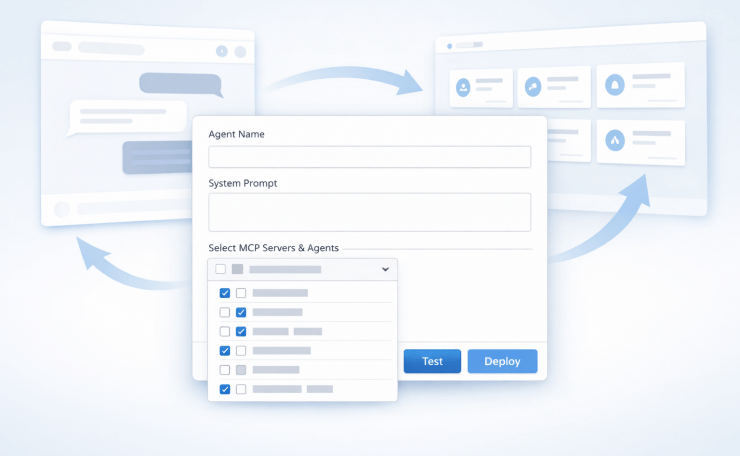
The Studio is a web form — an agent studio built for no-code deployment — where you configure an agent, test it live before committing, and deploy it without touching a file, a terminal, or a wheel install. What gets deployed is a real agent, running the same framework, registered in the same discovery service, appearing in the same portal as every other agent.
Two paths into it:
The form — for everyone who just wants to build and deploy. Pick a name, pick an agent type, write a system prompt, select tools from a dropdown, set model preferences. The form maps directly to the YAML schema. When you submit, the Studio generates the YAML file for you.
YAML upload — for engineers who already have a config and want a faster path to deploy than going through the admin panel manually. Upload the file, the Studio validates it, you move straight to the test step.
Either way, nothing is deployed until you’ve tested it.
No-Code Tool Selection: The Live Dropdown
The biggest problem with writing a YAML by hand was knowing what tools were available to use. The docs listed them. The portal showed them. But neither was in the same place as the config you were writing, and “go read the docs, come back, type the name correctly” is friction that most people won’t bother with.
The Studio solved this by pulling from the same discovery service API the portal already used. The tool dropdown wasn’t a hardcoded list — it was a live call to `GET /agents` and the Model Context Protocol (MCP) server registry, rendered as a multiselect. Every available tool, every registered MCP server, every agent that could be used as a tool — all in one dropdown, updated automatically whenever something new was deployed.
This meant non-engineers didn’t need to know tool names or MCP server addresses. They browsed a list and ticked boxes. The Studio handled the rest.
It also meant that combining agents as tools — something that previously required understanding how orchestration worked — became a UI operation. Select the customer service agent as a tool. Select the product search MCP server. Give the orchestrator agent a system prompt that coordinates between them. Submit.
Test Before You Deploy: No-Code Agent Deployment in Practice
This was the part that changed the most about how people used the Studio.
Before this, the workflow was: write config → submit for review → admin deploys → agent appears in portal → find out if it works. The feedback loop had multiple handoffs and could take a day. If the system prompt was wrong, or the tool selection didn’t match the use case, you found out after deployment.
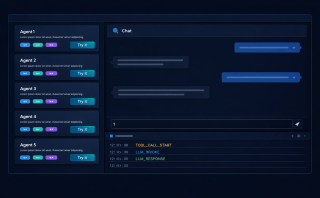
The Studio replaced that with a test step that happened before any submission. After filling the form, you clicked “Test” instead of “Deploy.” The Studio spun up a temporary agent — same runtime, same tools, same system prompt — and opened a chat panel right there in the browser. You talked to it. You threw real questions at it. You found out whether it behaved the way you intended.
The temporary agent lived as long as your session was active. Close the tab, it’s gone. It was never registered in the discovery service, never appeared in the portal, never touched production. It was entirely disposable.
Only when you were satisfied did you click “Deploy.” At that point the Studio wrote the YAML, triggered the deployment, and the agent registered itself in the discovery service. Within seconds, it appeared in the portal.
That “within seconds” detail mattered to people more than I expected. Seeing the agent you just configured appear in the portal, live and chatting, felt different from the old workflow. It felt like you’d built something. Which, of course, you had.
The Full Loop
By this point the system had a complete lifecycle that required no help from me at any stage:
Studio — configure the agent using a form, select tools from a live dropdown, test it in a temporary chat before deploying
Discovery service — agent registers itself on startup, available to everything that reads the registry
Portal — browse registered agents, try them with real questions, copy the endpoint
Integrate — take the endpoint into your own code, workflow, or application
Building a new agent went from “ask the person who built the framework” to a process any team could run independently. The platform team’s role shifted from building agents to reviewing them — making sure standards were followed, catching things that didn’t need to be agents, ensuring the shared tool library was being used rather than duplicated.
The admin review didn’t go away. If anything it became more important, because more people could now reach the submission stage. But the quality of submissions improved. When teams had already tested their agent in the Studio and seen it work, they came to the review with something real, not a config they’d written speculatively and hoped was correct.
Who used the Agent Studio
The answer turned out to be: everyone.
Engineers used it because the form path was faster than writing YAML by hand and the test step caught errors before they became a review back-and-forth. Product managers used it to prototype ideas without waiting for engineering time. Business analysts built agents for their own workflows — data lookups, report generation, things they’d previously had to request from someone else.
The pattern that appeared most often was someone trying to automate something they did manually every day. Not a grand AI project. Just: I have a process, I run it the same way every time, and now I want an agent to do it. The AI agent studio’s no-code deployment made that a half-hour task instead of a development ticket.
That expansion of who could build agents was what the framework had been aiming at from Post 10 onwards. I had built it to standardise agent development for a team of engineers. What it ended up doing was extending that to everyone who understood the problem domain, regardless of whether they could write code.
Looking Back
I started this series by copying an Autogen example and not fully understanding what it was doing. I got it running, tweaked a few parameters, watched it produce output, and called it an agent. In retrospect it was barely that — a workflow with an LLM in the middle.
What I know now, having built the pieces from scratch: an agent is not the LLM. The LLM is one component. The agent is the loop around it — the tool registry, the session memory, the reasoning layer, the planning module, the thing that decides what to call and when to stop. Understanding that loop, and being able to build each part of it independently, is what made it possible to turn a local experiment into something a team could use and eventually something anyone in the organisation could extend.
The most useful thing I did wasn’t any specific component. It was building in a way that each piece was legible. The YAML config made agent behaviour inspectable without reading source code. The event stream made runtime behaviour observable. The agent studio made configuration — and no-code deployment — accessible without knowing the internals. Each layer of legibility reduced the dependency on me personally.
If I were starting today, I would use the same tools I used to learn — Copilot, ChatGPT, Gemini — but differently. Not to generate code I paste and run, but as teachers. Ask them to explain what’s happening inside an agent loop. Ask them why a ReAct pattern works for some problems and not others. Ask them what breaks when session memory isn’t isolated. Understanding those things lets you design a system. Generating code without that understanding lets you produce output that you can’t debug when it fails.
The fundamentals don’t age. The frameworks do.
Key Takeaways
- The YAML schema is the form schema. If your config is clean and well-defined, turning it into a UI is mostly a rendering problem
- Pull tool lists from the discovery service, not from documentation — the dropdown stays current automatically and removes a whole class of configuration errors
- Test before deploy, not after. A temporary agent that lives for one session costs nothing and eliminates the feedback loop of submit → review → deploy → find out it’s wrong
- Agents as tools belong in the dropdown too. Orchestration through the UI, not through YAML composition knowledge
- The admin review improves when people test first. Submissions become real things, not speculative configs
- Legibility scales better than documentation. Observable config, visible runtime, accessible UI — each layer reduces dependence on the person who built the system
- Use AI tools to learn, not just to generate. The fundamentals of how an agent loop works will matter long after the specific frameworks have changed
Try It Yourself
- [ ] Build a form with fields that map to your YAML schema — agent name, agent type, system prompt, model settings
- [ ] Populate the tool selection dropdown by calling your discovery service
GET /agentsendpoint - [ ] Add a “Test” button that spins up a temporary in-memory agent with the form configuration and opens a chat panel
- [ ] Add a “Deploy” button that writes the YAML, triggers the agent process, and waits for the registration confirmation from the discovery service
- [ ] Confirm the newly deployed agent appears in the portal within a few seconds of deployment
- [ ] Add YAML upload support with server-side schema validation before the test step
- [ ] Track which tools are used across deployed agents — find out if shared MCP servers are actually being used
For building the form UI quickly, Streamlit is a solid option. For server-side YAML schema validation, Pydantic works well out of the box.
Previous: The Portal — Try Before You Integrate
This is the final post in the “My Journey in Building Agents from Scratch” series.